<?xml version="1.0" encoding="utf-8"?><feed xmlns="http://www.w3.org/2005/Atom" xml:lang="en_US"><generator uri="https://jekyllrb.com/" version="3.10.0">Jekyll</generator><link href="https://roger.zone/feed.xml" rel="self" type="application/atom+xml" /><link href="https://roger.zone/" rel="alternate" type="text/html" hreflang="en_US" /><updated>2026-09-10T18:34:02+08:00</updated><id>https://roger.zone/feed.xml</id><title type="html">Roger Lee</title><subtitle>Roger&apos;s Homepage</subtitle><author><name>Roger</name></author><entry><title type="html">Caution Tape Border with CALayer</title><link href="https://roger.zone/post/caution-tape-border-with-calayer/" rel="alternate" type="text/html" title="Caution Tape Border with CALayer" /><published>2026-07-16T21:30:00+08:00</published><updated>2026-07-16T21:30:00+08:00</updated><id>https://roger.zone/post/caution-tape-border-with-calayer</id><content type="html" xml:base="https://roger.zone/post/caution-tape-border-with-calayer/"><![CDATA[<p>This is an intermediate product from one of my projects. The feature was not in use, but the view itself is a fun little thing: a caution tape-style border (yellow and black stripes) drawn around a rounded rect. Several interesting attempts were made. Rather than discarding them outright, I have documented the attempts here.</p>

<h2 id="first-attempt-mask-a-striped-fill-with-the-stroke">First attempt: mask a striped fill with the stroke</h2>

<p>My first attempt was much clumsier: draw a pure yellow rounded rect, then copy a rotated black rectangle over it again and again:</p>

<svg viewBox="0 0 320 120" width="320" style="max-width: 100%;">
  <defs>
    <pattern id="tape-stripes-fill" width="28" height="28" patternTransform="rotate(45)" patternUnits="userSpaceOnUse">
      <rect width="28" height="28" fill="#FFD700" />
      <rect width="14" height="28" fill="#000" />
    </pattern>
  </defs>
  <rect width="320" height="120" rx="24" fill="url(#tape-stripes-fill)" />
</svg>

<p>then use the border stroke as a mask to cut out the ring:</p>

<svg viewBox="0 0 320 120" width="320" style="max-width: 100%;">
  <defs>
    <pattern id="tape-stripes-ring" width="28" height="28" patternTransform="rotate(45)" patternUnits="userSpaceOnUse">
      <rect width="28" height="28" fill="#FFD700" />
      <rect width="14" height="28" fill="#000" />
    </pattern>
    <mask id="tape-ring-mask">
      <rect x="6" y="6" width="308" height="108" rx="18" fill="none" stroke="#fff" stroke-width="12" />
    </mask>
  </defs>
  <rect width="320" height="120" rx="24" fill="url(#tape-stripes-ring)" mask="url(#tape-ring-mask)" />
</svg>

<p>It did render, but the stripes do not follow the path. Look at the top left and bottom right corners: the bars run almost parallel to the arc there, and the rhythm falls apart. So I threw it away.</p>

<h2 id="second-attempt-rotate-a-bar-around-the-center">Second attempt: rotate a bar around the center</h2>

<p>The yellow rounded rect stays as the background. This time the black rectangle is as long as the long side, rotated around the center and copied n times. The angles are not uniform, they are picked so the bars land evenly on the border:</p>

<svg viewBox="0 0 320 120" width="320" style="max-width: 100%;">
  <rect width="320" height="120" rx="24" fill="#FFD700" />
  <g fill="#000">
    <rect x="-40" y="53" width="400" height="14" transform="rotate(6.2 160 60)" />
    <rect x="-40" y="53" width="400" height="14" transform="rotate(18.1 160 60)" />
    <rect x="-40" y="53" width="400" height="14" transform="rotate(24.8 160 60)" />
    <rect x="-40" y="53" width="400" height="14" transform="rotate(32.9 160 60)" />
    <rect x="-40" y="53" width="400" height="14" transform="rotate(47.1 160 60)" />
    <rect x="-40" y="53" width="400" height="14" transform="rotate(72.8 160 60)" />
    <rect x="-40" y="53" width="400" height="14" transform="rotate(107.1 160 60)" />
    <rect x="-40" y="53" width="400" height="14" transform="rotate(132.8 160 60)" />
    <rect x="-40" y="53" width="400" height="14" transform="rotate(147.1 160 60)" />
    <rect x="-40" y="53" width="400" height="14" transform="rotate(155.2 160 60)" />
    <rect x="-40" y="53" width="400" height="14" transform="rotate(161.9 160 60)" />
    <rect x="-40" y="53" width="400" height="14" transform="rotate(173.8 160 60)" />
  </g>
</svg>

<p>then mask again:</p>

<svg viewBox="0 0 320 120" width="320" style="max-width: 100%;">
  <defs>
    <mask id="tape-spoke-mask">
      <rect x="6" y="6" width="308" height="108" rx="18" fill="none" stroke="#fff" stroke-width="12" />
    </mask>
  </defs>
  <g mask="url(#tape-spoke-mask)">
    <rect width="320" height="120" rx="24" fill="#FFD700" />
    <g fill="#000">
      <rect x="-40" y="53" width="400" height="14" transform="rotate(6.2 160 60)" />
      <rect x="-40" y="53" width="400" height="14" transform="rotate(18.1 160 60)" />
      <rect x="-40" y="53" width="400" height="14" transform="rotate(24.8 160 60)" />
      <rect x="-40" y="53" width="400" height="14" transform="rotate(32.9 160 60)" />
      <rect x="-40" y="53" width="400" height="14" transform="rotate(47.1 160 60)" />
      <rect x="-40" y="53" width="400" height="14" transform="rotate(72.8 160 60)" />
      <rect x="-40" y="53" width="400" height="14" transform="rotate(107.1 160 60)" />
      <rect x="-40" y="53" width="400" height="14" transform="rotate(132.8 160 60)" />
      <rect x="-40" y="53" width="400" height="14" transform="rotate(147.1 160 60)" />
      <rect x="-40" y="53" width="400" height="14" transform="rotate(155.2 160 60)" />
      <rect x="-40" y="53" width="400" height="14" transform="rotate(161.9 160 60)" />
      <rect x="-40" y="53" width="400" height="14" transform="rotate(173.8 160 60)" />
    </g>
  </g>
</svg>

<p>The gaps are even this time, but the widths are not: every bar meets the border at a different angle, so some black segments stay slim while others smear into long streaks. And the angle list has to be recomputed for every size. Threw it away again.</p>

<h2 id="the-final-version-two-strokes-on-one-path">The final version: two strokes on one path</h2>

<p>The final idea is simple: stack two <code class="language-plaintext highlighter-rouge">CAShapeLayer</code> with the same rounded rect path. The bottom one strokes solid yellow, the top one strokes black with a <code class="language-plaintext highlighter-rouge">lineDashPattern</code>, so the dash gaps reveal the yellow underneath.</p>

<p>This is what it looks like:</p>

<svg viewBox="0 0 320 120" width="320" style="max-width: 100%;">
  <rect x="6" y="6" width="308" height="108" rx="18" fill="none" stroke="#FFD700" stroke-width="12" />
  <rect x="6" y="6" width="308" height="108" rx="18" fill="none" stroke="#000" stroke-width="12" pathLength="58" stroke-dasharray="1 1" />
</svg>

<p>Note the dashes bend around the corners by themselves. That is the whole appeal of stroking a path instead of tiling a striped image: no slicing, no <code class="language-plaintext highlighter-rouge">resizableImage</code>, and any corner radius just works.</p>

<h2 id="the-tricky-part-making-the-stripes-meet">The tricky part: making the stripes meet</h2>

<p>If you hardcode a dash pattern like <code class="language-plaintext highlighter-rouge">[14, 14]</code>, the last segment almost never lands where the first one starts, leaving an ugly seam at the path’s starting point:</p>

<svg viewBox="-14 -14 348 148" width="308" style="max-width: 100%;">
  <rect x="6" y="6" width="308" height="108" rx="18" fill="none" stroke="#FFD700" stroke-width="12" />
  <rect x="6" y="6" width="308" height="108" rx="18" fill="none" stroke="#000" stroke-width="12" stroke-dasharray="14 14" />
  <circle cx="24" cy="6" r="16" fill="none" stroke="#FF3B30" stroke-width="2" />
</svg>

<p>The fix is to measure the real perimeter, then scale the dash so it fits a whole number of times. For a rounded rect the perimeter has a closed form: four straight edges shortened by the corners, plus four quarter circles.</p>

<div class="language-swift highlighter-rouge"><div class="highlight"><pre class="highlight"><code><span class="c1">// 2 * (w + h) - 8 * r  straight parts</span>
<span class="c1">//     + 2 * .pi * r    four quarter arcs</span>
<span class="k">let</span> <span class="nv">perimeter</span> <span class="o">=</span> <span class="mi">2</span> <span class="o">*</span> <span class="p">(</span><span class="n">width</span> <span class="o">+</span> <span class="n">height</span><span class="p">)</span> <span class="o">+</span> <span class="n">radius</span> <span class="o">*</span> <span class="p">(</span><span class="mi">2</span> <span class="o">*</span> <span class="o">.</span><span class="n">pi</span> <span class="o">-</span> <span class="mi">8</span><span class="p">)</span>

<span class="k">let</span> <span class="nv">segmentCount</span> <span class="o">=</span> <span class="nf">max</span><span class="p">(</span><span class="mi">1</span><span class="p">,</span> <span class="kt">Int</span><span class="p">((</span><span class="n">perimeter</span> <span class="o">/</span> <span class="p">(</span><span class="mi">2</span> <span class="o">*</span> <span class="mi">14</span><span class="p">))</span><span class="o">.</span><span class="nf">rounded</span><span class="p">()))</span>
<span class="k">let</span> <span class="nv">segmentLength</span> <span class="o">=</span> <span class="n">perimeter</span> <span class="o">/</span> <span class="kt">CGFloat</span><span class="p">(</span><span class="mi">2</span> <span class="o">*</span> <span class="n">segmentCount</span><span class="p">)</span>
<span class="n">lineDashPattern</span> <span class="o">=</span> <span class="p">[</span><span class="n">segmentLength</span> <span class="k">as</span> <span class="kt">NSNumber</span><span class="p">,</span> <span class="n">segmentLength</span> <span class="k">as</span> <span class="kt">NSNumber</span><span class="p">]</span>
</code></pre></div></div>

<p><code class="language-plaintext highlighter-rouge">14</code> is the target segment length. The actual length is stretched or squeezed a little so that the pattern repeats a whole number of times and closes the loop perfectly:</p>

<svg viewBox="-14 -14 348 148" width="308" style="max-width: 100%;">
  <rect x="6" y="6" width="308" height="108" rx="18" fill="none" stroke="#FFD700" stroke-width="12" />
  <rect x="6" y="6" width="308" height="108" rx="18" fill="none" stroke="#000" stroke-width="12" pathLength="58" stroke-dasharray="1 1" />
</svg>

<p>Note that the path is stroked at <code class="language-plaintext highlighter-rouge">insetBy(dx: lineWidth / 2, dy: lineWidth / 2)</code>, so the perimeter must be calculated from the inset size and the reduced corner radius as well, otherwise the last segment still drifts.</p>

<h2 id="interruptible-animation">Interruptible animation</h2>

<p>The border can appear, disappear, and change frame at any time. So <code class="language-plaintext highlighter-rouge">update</code> captures <code class="language-plaintext highlighter-rouge">presentation()?.opacity</code> and <code class="language-plaintext highlighter-rouge">presentation()?.path</code> first, then animates from those values. If an animation is interrupted halfway, the new one starts from where the layer visually is, not from the stale model value.</p>

<h2 id="full-code">Full code</h2>

<div class="language-swift highlighter-rouge"><div class="highlight"><pre class="highlight"><code><span class="kd">import</span> <span class="kt">UIKit</span>

<span class="kd">final</span> <span class="kd">class</span> <span class="kt">CautionTapeBorder</span> <span class="p">{</span>
    <span class="k">let</span> <span class="nv">layer</span> <span class="o">=</span> <span class="kt">CALayer</span><span class="p">()</span>
    <span class="kd">private</span> <span class="k">let</span> <span class="nv">yellowLayer</span> <span class="o">=</span> <span class="kt">CAShapeLayer</span><span class="p">()</span>
    <span class="kd">private</span> <span class="k">let</span> <span class="nv">blackLayer</span> <span class="o">=</span> <span class="kt">CAShapeLayer</span><span class="p">()</span>

    <span class="nf">init</span><span class="p">()</span> <span class="p">{</span>
        <span class="n">layer</span><span class="o">.</span><span class="n">opacity</span> <span class="o">=</span> <span class="mi">0</span>
        <span class="n">yellowLayer</span><span class="o">.</span><span class="n">fillColor</span> <span class="o">=</span> <span class="kc">nil</span>
        <span class="n">yellowLayer</span><span class="o">.</span><span class="n">strokeColor</span> <span class="o">=</span> <span class="kt">UIColor</span><span class="p">(</span><span class="nv">red</span><span class="p">:</span> <span class="mi">1</span><span class="p">,</span> <span class="nv">green</span><span class="p">:</span> <span class="mf">0.84</span><span class="p">,</span> <span class="nv">blue</span><span class="p">:</span> <span class="mi">0</span><span class="p">,</span> <span class="nv">alpha</span><span class="p">:</span> <span class="mi">1</span><span class="p">)</span><span class="o">.</span><span class="n">cgColor</span>
        <span class="n">blackLayer</span><span class="o">.</span><span class="n">fillColor</span> <span class="o">=</span> <span class="kc">nil</span>
        <span class="n">blackLayer</span><span class="o">.</span><span class="n">strokeColor</span> <span class="o">=</span> <span class="kt">UIColor</span><span class="o">.</span><span class="n">black</span><span class="o">.</span><span class="n">cgColor</span>
        <span class="n">layer</span><span class="o">.</span><span class="nf">addSublayer</span><span class="p">(</span><span class="n">yellowLayer</span><span class="p">)</span>
        <span class="n">layer</span><span class="o">.</span><span class="nf">addSublayer</span><span class="p">(</span><span class="n">blackLayer</span><span class="p">)</span>
    <span class="p">}</span>

    <span class="kd">func</span> <span class="nf">update</span><span class="p">(</span>
        <span class="nv">frame</span><span class="p">:</span> <span class="kt">CGRect</span><span class="p">,</span>
        <span class="nv">cornerRadius</span><span class="p">:</span> <span class="kt">CGFloat</span><span class="p">,</span>
        <span class="nv">lineWidth</span><span class="p">:</span> <span class="kt">CGFloat</span><span class="p">,</span>
        <span class="nv">isVisible</span><span class="p">:</span> <span class="kt">Bool</span><span class="p">,</span>
        <span class="nv">animated</span><span class="p">:</span> <span class="kt">Bool</span>
    <span class="p">)</span> <span class="p">{</span>
        <span class="k">let</span> <span class="nv">previousOpacity</span> <span class="o">=</span> <span class="n">layer</span><span class="o">.</span><span class="nf">presentation</span><span class="p">()?</span><span class="o">.</span><span class="n">opacity</span> <span class="p">??</span> <span class="n">layer</span><span class="o">.</span><span class="n">opacity</span>
        <span class="k">let</span> <span class="nv">previousPath</span> <span class="o">=</span> <span class="n">yellowLayer</span><span class="o">.</span><span class="nf">presentation</span><span class="p">()?</span><span class="o">.</span><span class="n">path</span> <span class="p">??</span> <span class="n">yellowLayer</span><span class="o">.</span><span class="n">path</span>
        <span class="k">let</span> <span class="nv">path</span><span class="p">:</span> <span class="kt">CGPath</span> <span class="o">=</span> <span class="p">{</span>
            <span class="k">guard</span> <span class="n">lineWidth</span> <span class="o">&gt;</span> <span class="mi">0</span><span class="p">,</span> <span class="n">frame</span><span class="o">.</span><span class="n">width</span> <span class="o">&gt;</span> <span class="mi">0</span><span class="p">,</span> <span class="n">frame</span><span class="o">.</span><span class="n">height</span> <span class="o">&gt;</span> <span class="mi">0</span> <span class="k">else</span> <span class="p">{</span>
                <span class="k">return</span> <span class="kt">CGMutablePath</span><span class="p">()</span>
            <span class="p">}</span>

            <span class="k">let</span> <span class="nv">inset</span> <span class="o">=</span> <span class="n">lineWidth</span> <span class="o">/</span> <span class="mi">2</span>
            <span class="k">let</span> <span class="nv">strokeRect</span> <span class="o">=</span> <span class="kt">CGRect</span><span class="p">(</span><span class="nv">origin</span><span class="p">:</span> <span class="o">.</span><span class="n">zero</span><span class="p">,</span> <span class="nv">size</span><span class="p">:</span> <span class="n">frame</span><span class="o">.</span><span class="n">size</span><span class="p">)</span><span class="o">.</span><span class="nf">insetBy</span><span class="p">(</span><span class="nv">dx</span><span class="p">:</span> <span class="n">inset</span><span class="p">,</span> <span class="nv">dy</span><span class="p">:</span> <span class="n">inset</span><span class="p">)</span>
            <span class="k">guard</span> <span class="n">strokeRect</span><span class="o">.</span><span class="n">width</span> <span class="o">&gt;</span> <span class="mi">0</span><span class="p">,</span> <span class="n">strokeRect</span><span class="o">.</span><span class="n">height</span> <span class="o">&gt;</span> <span class="mi">0</span> <span class="k">else</span> <span class="p">{</span> <span class="k">return</span> <span class="kt">CGMutablePath</span><span class="p">()</span> <span class="p">}</span>
            <span class="k">return</span> <span class="kt">UIBezierPath</span><span class="p">(</span>
                <span class="nv">roundedRect</span><span class="p">:</span> <span class="n">strokeRect</span><span class="p">,</span>
                <span class="nv">cornerRadius</span><span class="p">:</span> <span class="nf">max</span><span class="p">(</span><span class="mi">0</span><span class="p">,</span> <span class="n">cornerRadius</span> <span class="o">-</span> <span class="n">inset</span><span class="p">)</span>
            <span class="p">)</span><span class="o">.</span><span class="n">cgPath</span>
        <span class="p">}()</span>
        <span class="k">let</span> <span class="nv">width</span> <span class="o">=</span> <span class="nf">max</span><span class="p">(</span><span class="mi">0</span><span class="p">,</span> <span class="n">frame</span><span class="o">.</span><span class="n">width</span> <span class="o">-</span> <span class="n">lineWidth</span><span class="p">)</span>
        <span class="k">let</span> <span class="nv">height</span> <span class="o">=</span> <span class="nf">max</span><span class="p">(</span><span class="mi">0</span><span class="p">,</span> <span class="n">frame</span><span class="o">.</span><span class="n">height</span> <span class="o">-</span> <span class="n">lineWidth</span><span class="p">)</span>
        <span class="k">let</span> <span class="nv">radius</span> <span class="o">=</span> <span class="nf">min</span><span class="p">(</span><span class="nf">max</span><span class="p">(</span><span class="mi">0</span><span class="p">,</span> <span class="n">cornerRadius</span> <span class="o">-</span> <span class="n">lineWidth</span> <span class="o">/</span> <span class="mi">2</span><span class="p">),</span> <span class="nf">min</span><span class="p">(</span><span class="n">width</span><span class="p">,</span> <span class="n">height</span><span class="p">)</span> <span class="o">/</span> <span class="mi">2</span><span class="p">)</span>
        <span class="k">let</span> <span class="nv">perimeter</span> <span class="o">=</span> <span class="mi">2</span> <span class="o">*</span> <span class="p">(</span><span class="n">width</span> <span class="o">+</span> <span class="n">height</span><span class="p">)</span> <span class="o">+</span> <span class="n">radius</span> <span class="o">*</span> <span class="p">(</span><span class="mi">2</span> <span class="o">*</span> <span class="o">.</span><span class="n">pi</span> <span class="o">-</span> <span class="mi">8</span><span class="p">)</span>
        <span class="k">let</span> <span class="nv">lineDashPattern</span><span class="p">:</span> <span class="p">[</span><span class="kt">NSNumber</span><span class="p">]?</span>
        <span class="k">if</span> <span class="n">perimeter</span> <span class="o">&gt;</span> <span class="mi">0</span> <span class="p">{</span>
            <span class="k">let</span> <span class="nv">segmentCount</span> <span class="o">=</span> <span class="nf">max</span><span class="p">(</span><span class="mi">1</span><span class="p">,</span> <span class="kt">Int</span><span class="p">((</span><span class="n">perimeter</span> <span class="o">/</span> <span class="p">(</span><span class="mi">2</span> <span class="o">*</span> <span class="mi">14</span><span class="p">))</span><span class="o">.</span><span class="nf">rounded</span><span class="p">()))</span>
            <span class="k">let</span> <span class="nv">segmentLength</span> <span class="o">=</span> <span class="n">perimeter</span> <span class="o">/</span> <span class="kt">CGFloat</span><span class="p">(</span><span class="mi">2</span> <span class="o">*</span> <span class="n">segmentCount</span><span class="p">)</span>
            <span class="n">lineDashPattern</span> <span class="o">=</span> <span class="p">[</span><span class="n">segmentLength</span> <span class="k">as</span> <span class="kt">NSNumber</span><span class="p">,</span> <span class="n">segmentLength</span> <span class="k">as</span> <span class="kt">NSNumber</span><span class="p">]</span>
        <span class="p">}</span> <span class="k">else</span> <span class="p">{</span>
            <span class="n">lineDashPattern</span> <span class="o">=</span> <span class="kc">nil</span>
        <span class="p">}</span>
        <span class="k">let</span> <span class="nv">newOpacity</span><span class="p">:</span> <span class="kt">Float</span> <span class="o">=</span> <span class="n">isVisible</span> <span class="o">&amp;&amp;</span> <span class="n">lineWidth</span> <span class="o">&gt;</span> <span class="mi">0</span> <span class="p">?</span> <span class="mi">1</span> <span class="p">:</span> <span class="mi">0</span>

        <span class="kt">CATransaction</span><span class="o">.</span><span class="nf">begin</span><span class="p">()</span>
        <span class="kt">CATransaction</span><span class="o">.</span><span class="nf">setDisableActions</span><span class="p">(</span><span class="kc">true</span><span class="p">)</span>
        <span class="n">layer</span><span class="o">.</span><span class="n">frame</span> <span class="o">=</span> <span class="n">frame</span>
        <span class="n">layer</span><span class="o">.</span><span class="n">opacity</span> <span class="o">=</span> <span class="n">newOpacity</span>
        <span class="n">yellowLayer</span><span class="o">.</span><span class="n">frame</span> <span class="o">=</span> <span class="n">layer</span><span class="o">.</span><span class="n">bounds</span>
        <span class="n">yellowLayer</span><span class="o">.</span><span class="n">path</span> <span class="o">=</span> <span class="n">path</span>
        <span class="n">yellowLayer</span><span class="o">.</span><span class="n">lineWidth</span> <span class="o">=</span> <span class="n">lineWidth</span>
        <span class="n">blackLayer</span><span class="o">.</span><span class="n">frame</span> <span class="o">=</span> <span class="n">layer</span><span class="o">.</span><span class="n">bounds</span>
        <span class="n">blackLayer</span><span class="o">.</span><span class="n">path</span> <span class="o">=</span> <span class="n">path</span>
        <span class="n">blackLayer</span><span class="o">.</span><span class="n">lineWidth</span> <span class="o">=</span> <span class="n">lineWidth</span>
        <span class="n">blackLayer</span><span class="o">.</span><span class="n">lineDashPattern</span> <span class="o">=</span> <span class="n">lineDashPattern</span>
        <span class="kt">CATransaction</span><span class="o">.</span><span class="nf">commit</span><span class="p">()</span>

        <span class="k">guard</span> <span class="n">animated</span> <span class="k">else</span> <span class="p">{</span> <span class="k">return</span> <span class="p">}</span>

        <span class="k">if</span> <span class="n">previousOpacity</span> <span class="o">!=</span> <span class="n">newOpacity</span> <span class="p">{</span>
            <span class="k">let</span> <span class="nv">opacityAnimation</span> <span class="o">=</span> <span class="kt">CABasicAnimation</span><span class="p">(</span><span class="nv">keyPath</span><span class="p">:</span> <span class="s">"opacity"</span><span class="p">)</span>
            <span class="n">opacityAnimation</span><span class="o">.</span><span class="n">fromValue</span> <span class="o">=</span> <span class="n">previousOpacity</span>
            <span class="n">opacityAnimation</span><span class="o">.</span><span class="n">toValue</span> <span class="o">=</span> <span class="n">newOpacity</span>
            <span class="n">opacityAnimation</span><span class="o">.</span><span class="n">duration</span> <span class="o">=</span> <span class="mf">0.2</span>
            <span class="n">opacityAnimation</span><span class="o">.</span><span class="n">timingFunction</span> <span class="o">=</span> <span class="kt">CAMediaTimingFunction</span><span class="p">(</span><span class="nv">name</span><span class="p">:</span> <span class="o">.</span><span class="n">easeInEaseOut</span><span class="p">)</span>
            <span class="n">layer</span><span class="o">.</span><span class="nf">add</span><span class="p">(</span><span class="n">opacityAnimation</span><span class="p">,</span> <span class="nv">forKey</span><span class="p">:</span> <span class="s">"cautionOpacityTransition"</span><span class="p">)</span>
        <span class="p">}</span>

        <span class="k">if</span> <span class="n">previousOpacity</span> <span class="o">&gt;</span> <span class="mi">0</span> <span class="o">||</span> <span class="n">newOpacity</span> <span class="o">&gt;</span> <span class="mi">0</span><span class="p">,</span> <span class="n">previousPath</span> <span class="o">!=</span> <span class="n">path</span> <span class="p">{</span>
            <span class="k">let</span> <span class="nv">pathAnimation</span> <span class="o">=</span> <span class="kt">CABasicAnimation</span><span class="p">(</span><span class="nv">keyPath</span><span class="p">:</span> <span class="s">"path"</span><span class="p">)</span>
            <span class="n">pathAnimation</span><span class="o">.</span><span class="n">fromValue</span> <span class="o">=</span> <span class="n">previousPath</span>
            <span class="n">pathAnimation</span><span class="o">.</span><span class="n">toValue</span> <span class="o">=</span> <span class="n">path</span>
            <span class="n">pathAnimation</span><span class="o">.</span><span class="n">duration</span> <span class="o">=</span> <span class="mf">0.2</span>
            <span class="n">pathAnimation</span><span class="o">.</span><span class="n">timingFunction</span> <span class="o">=</span> <span class="kt">CAMediaTimingFunction</span><span class="p">(</span><span class="nv">name</span><span class="p">:</span> <span class="o">.</span><span class="n">easeInEaseOut</span><span class="p">)</span>
            <span class="n">yellowLayer</span><span class="o">.</span><span class="nf">add</span><span class="p">(</span><span class="n">pathAnimation</span><span class="p">,</span> <span class="nv">forKey</span><span class="p">:</span> <span class="s">"cautionPathTransition"</span><span class="p">)</span>
            <span class="n">blackLayer</span><span class="o">.</span><span class="nf">add</span><span class="p">(</span><span class="n">pathAnimation</span><span class="p">,</span> <span class="nv">forKey</span><span class="p">:</span> <span class="s">"cautionPathTransition"</span><span class="p">)</span>
        <span class="p">}</span>
    <span class="p">}</span>
<span class="p">}</span>
</code></pre></div></div>]]></content><author><name>Roger</name></author><category term="UIKit" /><summary type="html"><![CDATA[This is an intermediate product from one of my projects. The feature was not in use, but the view itself is a fun little thing: a caution tape-style border (yellow and black stripes) drawn around a rounded rect. Several interesting attempts were made. Rather than discarding them outright, I have documented the attempts here.]]></summary></entry><entry><title type="html">Play sound on macOS when Codex complete task</title><link href="https://roger.zone/post/play-sound-on-macos-when-codex-complete-task/" rel="alternate" type="text/html" title="Play sound on macOS when Codex complete task" /><published>2025-10-19T15:45:54+08:00</published><updated>2025-10-19T15:45:54+08:00</updated><id>https://roger.zone/post/play-sound-on-macos-when-codex-complete-task</id><content type="html" xml:base="https://roger.zone/post/play-sound-on-macos-when-codex-complete-task/"><![CDATA[<p>Codex CLI can run a command when a task finishes. On macOS, that command can trigger a Shortcut with elevated permissions so the system plays a sound (or delivers any other notification) without additional prompts.</p>

<p>There are two ways to wire this up. Pick the one that fits your Codex setup. Both examples below call the same <code class="language-plaintext highlighter-rouge">notify.sh</code> script.</p>

<h2 id="option-1-notify-in-configtoml">Option 1: notify in config.toml</h2>

<p>Add the following snippet to your Codex configuration file (for example <code class="language-plaintext highlighter-rouge">~/.codex/config.toml</code>):</p>

<div class="language-toml highlighter-rouge"><div class="highlight"><pre class="highlight"><code><span class="py">notify</span> <span class="p">=</span> <span class="p">[</span><span class="s">"zsh"</span><span class="p">,</span> <span class="s">"/Users/roger/.codex/notify.sh"</span><span class="p">]</span>

<span class="nn">[tui]</span>
<span class="py">notifications</span> <span class="p">=</span> <span class="kc">true</span>
</code></pre></div></div>

<p>The <code class="language-plaintext highlighter-rouge">notify</code> array tells Codex to execute a shell script after each completed task, and the <code class="language-plaintext highlighter-rouge">tui</code> flag keeps the built-in notifications enabled.</p>

<h2 id="option-2-hooks">Option 2: hooks</h2>

<p>If you prefer Codex hooks, create or edit <code class="language-plaintext highlighter-rouge">~/.codex/hooks.json</code>:</p>

<div class="language-json highlighter-rouge"><div class="highlight"><pre class="highlight"><code><span class="p">{</span><span class="w">
  </span><span class="nl">"hooks"</span><span class="p">:</span><span class="w"> </span><span class="p">{</span><span class="w">
    </span><span class="nl">"Stop"</span><span class="p">:</span><span class="w"> </span><span class="p">[</span><span class="w">
      </span><span class="p">{</span><span class="w">
        </span><span class="nl">"hooks"</span><span class="p">:</span><span class="w"> </span><span class="p">[</span><span class="w">
          </span><span class="p">{</span><span class="w">
            </span><span class="nl">"type"</span><span class="p">:</span><span class="w"> </span><span class="s2">"command"</span><span class="p">,</span><span class="w">
            </span><span class="nl">"command"</span><span class="p">:</span><span class="w"> </span><span class="s2">"zsh /Users/roger/.codex/notify.sh"</span><span class="p">,</span><span class="w">
            </span><span class="nl">"timeout"</span><span class="p">:</span><span class="w"> </span><span class="mi">3</span><span class="w">
          </span><span class="p">}</span><span class="w">
        </span><span class="p">]</span><span class="w">
      </span><span class="p">}</span><span class="w">
    </span><span class="p">]</span><span class="w">
  </span><span class="p">}</span><span class="w">
</span><span class="p">}</span><span class="w">
</span></code></pre></div></div>

<p>Then enable hooks in <code class="language-plaintext highlighter-rouge">~/.codex/config.toml</code>:</p>

<div class="language-toml highlighter-rouge"><div class="highlight"><pre class="highlight"><code><span class="nn">[features]</span>
<span class="py">codex_hooks</span> <span class="p">=</span> <span class="kc">true</span>
</code></pre></div></div>

<p>You do not need both approaches. Use <strong><code class="language-plaintext highlighter-rouge">notify</code></strong> if you want the simple global callback. If you rely on <strong>Computer Use</strong>, prefer <strong>hooks</strong> because Codex’s <strong>April 2026 Computer Use update</strong> can override the <strong><code class="language-plaintext highlighter-rouge">notify</code></strong> setting.</p>

<h2 id="create-the-notify-script">Create the notify script</h2>

<p>Create the script referenced above at <code class="language-plaintext highlighter-rouge">/Users/roger/.codex/notify.sh</code>:</p>

<div class="language-zsh highlighter-rouge"><div class="highlight"><pre class="highlight"><code><span class="c">#!/bin/zsh</span>
/usr/bin/shortcuts run <span class="s2">"Codex Done"</span>
</code></pre></div></div>

<p>Grant execute permission with <code class="language-plaintext highlighter-rouge">chmod +x ~/.codex/notify.sh</code>. The script calls the Shortcuts CLI to run a Shortcut named “Codex Done”. Inside Shortcuts, you can assemble any combination of sounds, alerts, or automations that require higher privileges than a standard CLI hook can access.</p>

<h2 id="configure-the-shortcut-sound">Configure the Shortcut sound</h2>

<p>Use this template Shortcut link to jump-start your automation: <a href="https://www.icloud.com/shortcuts/5ae53ade276f4197ab13f9679cd957cc">Codex Done (iCloud)</a>.</p>

<!--  Usage: include image.html file="file_name.file_typ" alt="alt_string" -->

<p><img src="/assets/posts/play-sound-on-macos-when-codex-complete-task/shortcut.jpeg" alt="Codex Done Shortcut layout" /></p>

<ul>
  <li>Base64-encode any <code class="language-plaintext highlighter-rouge">m4a</code> clip you want to ship with the Shortcut using <code class="language-plaintext highlighter-rouge">base64 -i sound.m4a -o sound.b64</code>, then paste that text into a Text block in Shortcuts.</li>
  <li>Add a <code class="language-plaintext highlighter-rouge">Base64 Encode/Decode</code> action set to Decode so the Shortcut reconstructs the audio file at runtime and hands it to a <code class="language-plaintext highlighter-rouge">Play Sound</code> action.</li>
</ul>

<h2 id="why-shortcuts">Why Shortcuts?</h2>

<p>Shortcuts runs outside the terminal sandbox and can interact with system-level features such as audio output, spoken notifications, or focus modes. By delegating to Shortcuts, Codex stays lightweight while still giving you a customizable, high-trust way to signal when work is finished.</p>

<p>Official references:</p>

<ul>
  <li><a href="https://github.com/openai/codex/blob/main/docs/config.md#notify">Codex notify config</a></li>
  <li><a href="https://developers.openai.com/codex/hooks">Codex hooks</a></li>
</ul>]]></content><author><name>Roger</name></author><category term="Codex" /><summary type="html"><![CDATA[Codex CLI can run a command when a task finishes. On macOS, that command can trigger a Shortcut with elevated permissions so the system plays a sound (or delivers any other notification) without additional prompts.]]></summary></entry><entry><title type="html">通过指定 Unicode 范围裁剪 TTF 字体文件</title><link href="https://roger.zone/post/reduce-ttf-font-file-size-using-python/" rel="alternate" type="text/html" title="通过指定 Unicode 范围裁剪 TTF 字体文件" /><published>2023-10-25T01:03:00+08:00</published><updated>2023-10-25T01:03:00+08:00</updated><id>https://roger.zone/post/reduce-ttf-font-file-size-using-python</id><content type="html" xml:base="https://roger.zone/post/reduce-ttf-font-file-size-using-python/"><![CDATA[<blockquote>
  <p>更新：23/10/25 更新脚本，保留更多字体细节</p>

  <p>更新：23/07/26 补充一个实用小脚本</p>
</blockquote>

<p>最近尝试为博客添加自定义字体，以在不同的浏览器上实现视觉一致性。你可能已经了解了 <code class="language-plaintext highlighter-rouge">@font-face</code> 这个 CSS 属性：</p>

<div class="language-css highlighter-rouge"><div class="highlight"><pre class="highlight"><code><span class="k">@font-face</span> <span class="p">{</span>
  <span class="nl">font-family</span><span class="p">:</span> <span class="s1">"FontName"</span><span class="p">;</span>
  <span class="nl">src</span><span class="p">:</span> <span class="sx">url("/assets/FontFile.ttf")</span><span class="p">;</span>
<span class="p">}</span>
</code></pre></div></div>

<p>但是在某些特定情况下，我们只需要字体文件的一小部分（英文字母或某些特殊符号），但是字体创建者没有提供小字体集版本。</p>

<h2 id="简易方法">简易方法</h2>

<p>我们可以使用 Python <a href="https://github.com/fonttools/fonttools">fontTools</a> 库手动减少字体文件大小，这个工具专注于合并、裁剪子集和转换字体文件。对于减小字体文件大小的场景，可以使用这个库提供的 <code class="language-plaintext highlighter-rouge">pyftsubset</code> 命令，最简单的方法是：</p>

<div class="language-shell highlighter-rouge"><div class="highlight"><pre class="highlight"><code><span class="c"># 安装 fonttools，我使用的是 4.32.0 版本。</span>
pip <span class="nb">install </span>fonttools
pyftsubset Input.ttf <span class="nt">--output-file</span><span class="o">=</span>Output.ttf <span class="nt">--unicodes</span><span class="o">=</span>U+0000-007F
</code></pre></div></div>

<p>两个基本的参数含义分别为：</p>

<p><code class="language-plaintext highlighter-rouge">--output-file=</code>：输出文件名。</p>

<p><code class="language-plaintext highlighter-rouge">--unicodes=</code>：以十六进制数字指定 Unicode 范围。比如 <code class="language-plaintext highlighter-rouge">U+0000-0007F</code> 表示 ASCII 码。</p>

<p>要查看更多选项，请访问 <a href="https://fonttools.readthedocs.io/en/latest/subset/index.html">fontTools 文档</a>。</p>

<h2 id="实用小脚本版本-2231025-更新">实用小脚本版本 2（23.10.25 更新）</h2>

<p>下方的脚本补充了更丰富的参数，使用方法同<a href="#实用小脚本版本-120230726-更新">版本 1</a>，区别在于可以保留 Features 和一些必要的扩展字符集合等等，最终文件会略大一些。如果只是简易的裁剪，仍然推荐使用<a href="#实用小脚本版本-120230726-更新">版本 1</a>。</p>

<div class="language-plaintext highlighter-rouge"><div class="highlight"><pre class="highlight"><code>#!/bin/bash

if [[ $# -lt 1 || !($1 == *.otf || $1 == *.ttf) ]]; then
  echo "Use VENV: source ./env/bin/activate"
  echo "Usage: subascii &lt;fontfile.otf/ttf&gt; [pyftsubset options...]"
  exit 1
fi

filename=$(basename -- "$1")
extension="${filename##*.}"
filename="${filename%.*}"

pyftsubset "$1" --output-file="${filename}-Sub.${extension}" --unicodes="U+0000-007F" "${@:2}" \
  --layout-features='*' --glyph-names --symbol-cmap --legacy-cmap \
  --notdef-glyph --notdef-outline --recommended-glyphs \
  --name-IDs='*' --name-legacy --name-languages='*'
</code></pre></div></div>

<h2 id="实用小脚本版本-120230726-更新">实用小脚本版本 1（2023.07.26 更新）</h2>

<p>分享一个小脚本，要求已经安装<code class="language-plaintext highlighter-rouge">fonttools</code>，运行后会产生一个 ASCII 子集的新文件，文件名结尾加<code class="language-plaintext highlighter-rouge">-Sub</code></p>

<p>用法举例：<code class="language-plaintext highlighter-rouge">./subascii.sh Rubik.ttf</code> 得到 <code class="language-plaintext highlighter-rouge">Rubik-sub.ttf</code></p>

<p>下面的保存为<code class="language-plaintext highlighter-rouge">subascii.sh</code></p>

<div class="language-plaintext highlighter-rouge"><div class="highlight"><pre class="highlight"><code>#!/bin/bash

if [[ $# -lt 1 || !($1 == *.otf || $1 == *.ttf) ]]; then
  echo "Use VENV: source ./env/bin/activate"
  echo "Usage: subascii &lt;fontfile.otf/ttf&gt; [pyftsubset options...]"
  exit 1
fi

filename=$(basename -- "$1")
extension="${filename##*.}"
filename="${filename%.*}"

pyftsubset "$1" --output-file="${filename}-Sub.${extension}" --unicodes=U+0000-007F "${@:2}"
</code></pre></div></div>

<h2 id="实际效果">实际效果</h2>

<p>这个结果可能没有实际意义，因为它取决于指定的 Unicode 范围大小，以及具体参数配置。以下是基于 <code class="language-plaintext highlighter-rouge">RobotoCondensed-Bold.ttf</code> 裁剪后的比对。</p>

<div class="language-plaintext highlighter-rouge"><div class="highlight"><pre class="highlight"><code>Input.ttf   162K
Output.ttf   22K
</code></pre></div></div>

<h2 id="在哪里找到字体文件">在哪里找到字体文件？</h2>

<p><strong>注意</strong>，字体并不总是被允许修改，请仔细查看字体使用许可证。</p>

<ul>
  <li><a href="http://fonts.google.com">Google Fonts</a></li>
  <li><a href="https://fonts.adobe.com">Adobe Fonts</a></li>
  <li><a href="https://www.hellofont.cn">Hello Font</a></li>
</ul>

<h2 id="在哪里找到-unicode-编码">在哪里找到 Unicode 编码？</h2>

<ul>
  <li><a href="http://www.unicode.org/charts/">Unicode 图表</a></li>
  <li><a href="https://unicodelookup.com">Unicode 查询</a></li>
</ul>]]></content><author><name>Roger</name></author><category term="Python" /><summary type="html"><![CDATA[更新：23/10/25 更新脚本，保留更多字体细节 更新：23/07/26 补充一个实用小脚本]]></summary></entry><entry><title type="html">SVG 转换 SwiftUI Shape</title><link href="https://roger.zone/post/svg-to-swiftui-shape/" rel="alternate" type="text/html" title="SVG 转换 SwiftUI Shape" /><published>2023-10-22T22:29:56+08:00</published><updated>2023-10-22T22:29:56+08:00</updated><id>https://roger.zone/post/svg-to-swiftui-shape</id><content type="html" xml:base="https://roger.zone/post/svg-to-swiftui-shape/"><![CDATA[<p>周末遇到了 SVG 转 SwiftUI Shape 的场景，发现了这个老项目：<a href="https://swiftvg.mike-engel.com">https://swiftvg.mike-engel.com</a></p>

<p>实际用了一下发现这个项目仅支持 UIKit。由于几年没有更新，存在一些问题。基于这个版本，创建一个分支给自己用。</p>

<p><a href="https://roger.zone/swiftuisvg" target="\_blank">https://roger.zone/swiftuisvg</a></p>

<h2 id="怎么使用">怎么使用</h2>

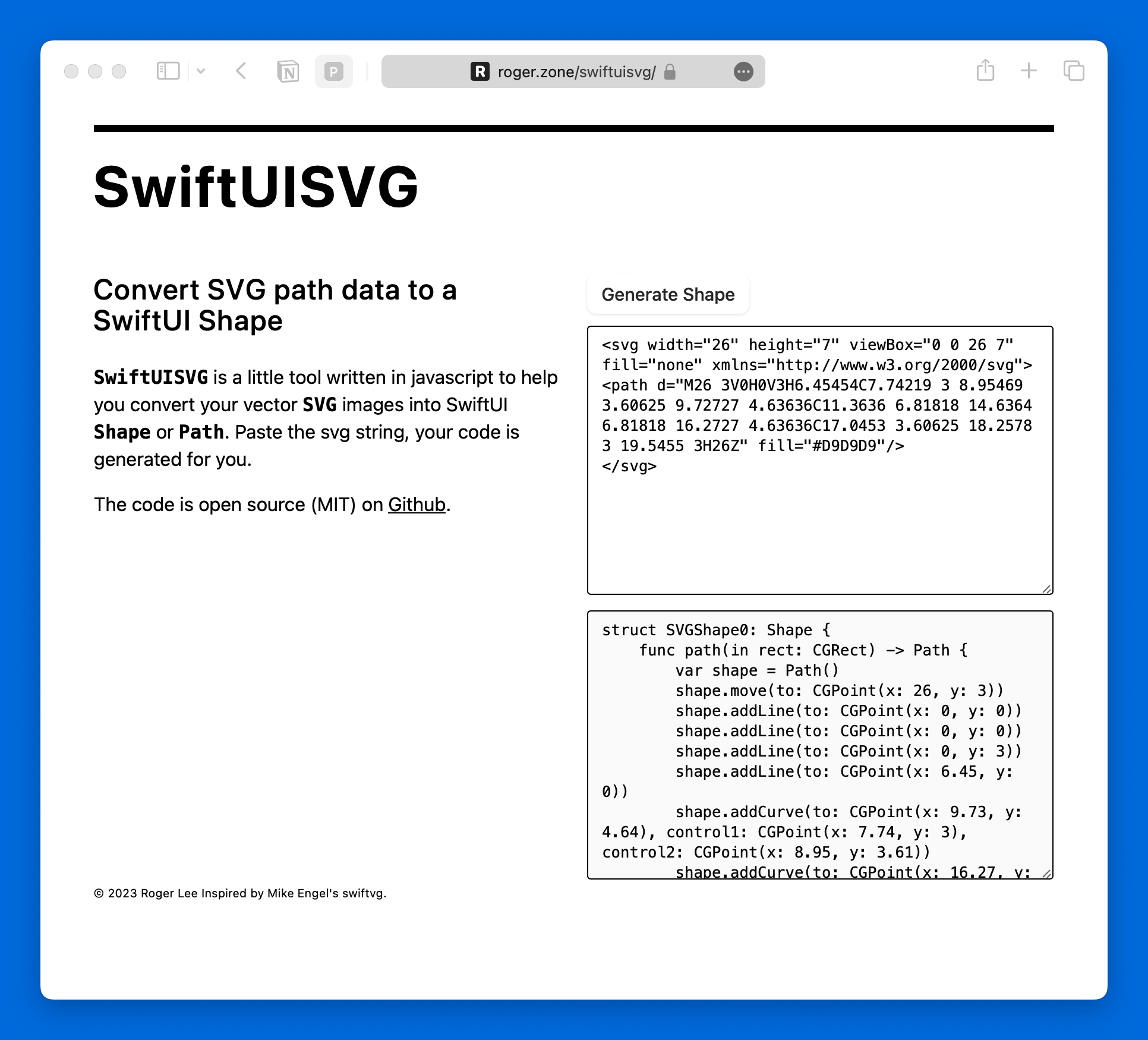
<p>贴上 SVG 代码然后点击转换即可</p>

<!--  Usage: include image.html file="file_name.file_typ" alt="alt_string" -->

<p><img src="/assets/posts/svg-to-swiftui-shape/screenshot.png" alt="Screenshot" /></p>

<h2 id="和原项目有什么差异">和原项目有什么差异</h2>

<p>一些修复，优化以及 SwiftUI 版本支持</p>

<ul>
  <li>支持直接贴 SVG（原始项目需要准确的贴一个 d 属性）</li>
  <li>支持自动换行</li>
  <li>直接生成 Shape 代码</li>
  <li>如果包括多个 path 从序号 0 开始依次生成</li>
</ul>

<h2 id="下一步">下一步</h2>

<ul>
  <li>支持更多 SVG 属性</li>
  <li>生成 Path 对象</li>
</ul>

<blockquote>
  <p>原项目采用 MIT 协议，我的分支同样保持了 MIT 协议，调整中遇到的问题也已经以 PR 形式反馈给原项目</p>
</blockquote>]]></content><author><name>Roger</name></author><category term="SwiftUI" /><summary type="html"><![CDATA[周末遇到了 SVG 转 SwiftUI Shape 的场景，发现了这个老项目：https://swiftvg.mike-engel.com]]></summary></entry><entry><title type="html">Xcode 通过 aria2 安装模拟器</title><link href="https://roger.zone/post/xcode-add-simulator-via-aria2/" rel="alternate" type="text/html" title="Xcode 通过 aria2 安装模拟器" /><published>2023-08-07T14:14:58+08:00</published><updated>2023-08-07T14:14:58+08:00</updated><id>https://roger.zone/post/xcode-add-simulator-via-aria2</id><content type="html" xml:base="https://roger.zone/post/xcode-add-simulator-via-aria2/"><![CDATA[<blockquote>
  <p>更新：24/04/01 建议使用 Xcodes，2.0 版本以内置本文的功能 https://www.xcodes.app</p>
</blockquote>

<blockquote>
  <p>更新：23/12/15 支持 iOS 17 以下模拟器下载链接</p>
</blockquote>

<p>Xcode 15 不再内置 iOS 模拟器，改为按需要增量安装。但这项改动带来新的问题：内置的模拟器下载工具速度很慢，而且没有断点续传。下载过程一旦因为网络波动而中断，需要从零重新开始下载。用 aria2 下载非常适合这个场景。</p>

<p><strong>⚠️ 以下内容需要你拥有开发者账号权限</strong></p>

<blockquote>
  <p>aria2 官方未提供 macOS 版本，如果不想自己编译可以通过 <a href="https://formulae.brew.sh/formula/aria2" target="\_blank">Homebrew</a> 安装</p>
</blockquote>

<h2 id="寻找下载链接">寻找下载链接</h2>

<h3 id="ios-17">iOS 17+</h3>

<p>常见的链接结构如下面所示，在开发者官网 <a href="https://developer.apple.com/download/all/?q=visionos" target="\_blank">More</a> 页面搜索得到。</p>

<p>https://download.developer.apple.com/Developer_Tools/iOS_17_beta_4_Simulator_Runtime/iOS_17_beta_4_Simulator_Runtime.dmg</p>

<h3 id="ios-16-及以下">iOS 16 及以下</h3>

<p><strong>更新：</strong>iOS 17 以下模拟器绑定在 Xcode 中，上面的列表无法搜索得到下载链接，但 Apple 在隐藏文档里列出了相应的链接：<em><a href="https://devimages-cdn.apple.com/downloads/xcode/simulators/index2.dvtdownloadableindex">点我搜索</a></em>，打开页面后搜索名称+版本。</p>

<h2 id="获取-cookies">获取 Cookies</h2>

<p>官网提供的下载链接无法直接下载，需要验证开发者账号权限，好在方式比较简单。登录自己的开发者账号，然后通过浏览器开发者面板 Cookies 窗口，寻找 <code class="language-plaintext highlighter-rouge">ADCDownloadAuth</code> 这个值。</p>

<h2 id="下载">下载</h2>

<p>替换{Cookies}为上一步获取的值，然后在 Terminal 执行就可以开始下载了。</p>

<div class="language-bash highlighter-rouge"><div class="highlight"><pre class="highlight"><code>aria2c <span class="nt">--header</span> <span class="s2">"Cookie: ADCDownloadAuth={Cookies}"</span> <span class="nt">-c</span> https://download.developer.apple.com/Developer_Tools/visionOS_1_beta_2_Simulator_Runtime/visionOS_1_beta_2_Simulator_Runtime.dmg
</code></pre></div></div>

<p><code class="language-plaintext highlighter-rouge">-c</code>: 启用断点续传</p>

<p><code class="language-plaintext highlighter-rouge">--header</code>: 添加请求头以通过验证</p>

<h2 id="生成脚本">生成脚本</h2>

<p>填写好 Cookies 和下载链接，然后点击下方按钮生成脚本，复制到 Terminal 执行即可。</p>

<style>
  #generator {
    width: 100%;
    margin: 0 auto;
  }

  #generator form {
    width: 100%;
    margin: 0 auto;
  }

  #generator form .form-group {
    width: 100%;
    margin: 0 auto;
  }

  #generator form .form-group label {
    width: 100%;
    margin: 0 auto;
    font: 14px "Helvetica Neue", Helvetica, Arial, sans-serif;
  }

  #generator form .form-group textarea {
    width: 100%;
    margin: 0 auto;
    border: 1px solid #ccc;
    padding: 8px;
    border-radius: 8px;
    resize: vertical;
  }

  #code-section {
    overflow: hidden;
    height: 0;
    animation: height 0.3s ease forwards;
  }
</style>

<div id="generator">
  <button id="genrate-button" type="button" class="copy-button">
    生成并复制
  </button>
  <form>
    <div class="form-group">
      <label for="cookies">Cookies</label>
      <textarea class="form-control" id="cookies" rows="3"></textarea>
    </div>
    <div class="form-group">
      <label for="url">URL</label>
      <!-- textarea -->
      <textarea class="form-control" id="url" rows="3"></textarea>
    </div>
    <div class="language-bash highlighter-rouge" id="code-section">
      <div class="highlight">
        <pre class="highlight"><code id="install-code">Hello World</code></pre>
      </div>
    </div>
  </form>
</div>

<script>
  (function () {
    let generateButton = document.getElementById("genrate-button");

    function generateAndCopy() {
      var cookies = document.getElementById("cookies").value;

      // save cookie to local storage
      localStorage.setItem("xcdownloadCookies", cookies);

      var url = document.getElementById("url").value;
      var command =
        `aria2c --header "Cookie: ADCDownloadAuth={Cookies}" -c {URL}`
          .replace("{Cookies}", cookies)
          .replace("{URL}", url);
      navigator.clipboard.writeText(command);

      generateButton.innerText = "已复制";
      generateButton.classList.add("copied");
      setTimeout(() => {
        generateButton.innerText = "生成并复制";
        generateButton.classList.remove("copied");
      }, 1500);

      let codeSection = document.getElementById("code-section");
      var filename = url.substring(url.lastIndexOf("/") + 1);
      if (filename !== "" && filename.includes("dmg")) {
        let codeField = document.getElementById("install-code");
        codeField.innerHTML =
          "#如需要选择版本，运行 sudo xcode-select -s /Applications/Xcode[版本号].app\nxcodebuild -runFirstLaunch\nxcrun simctl runtime add " +
          filename;
        codeSection.style.height = "auto";
      } else {
        codeSection.style.height = "0";
      }
    }

    // load cookie from local storage
    var cookies = localStorage.getItem("xcdownloadCookies");
    if (cookies != null) {
      document.getElementById("cookies").value = cookies;
    }

    generateButton.addEventListener("click", generateAndCopy);
  })();
</script>

<h2 id="安装模拟器">安装模拟器</h2>

<p>安装包含一组命令，官方教程链接为 <a href="https://developer.apple.com/documentation/xcode/installing-additional-simulator-runtimes#Install-and-manage-Simulator-runtimes-from-the-command-line">Command Line</a>。精简官方教程得到下方三行命令，通常情况下执行最后一条等待 Xcode 安装和验证模拟器。</p>

<div class="language-bash highlighter-rouge"><div class="highlight"><pre class="highlight"><code><span class="nb">sudo </span>xcode-select <span class="nt">-s</span> /Applications/Xcode-15.0.0-Beta.5.app
xcodebuild <span class="nt">-runFirstLaunch</span>
xcrun simctl runtime add iOS_17_beta_4_Simulator_Runtime.dmg
</code></pre></div></div>

<h2 id="补充">补充</h2>

<p>Apple 开发者官网提供了一份 JSON 文档，这份文档包含了所有可用的下载链接，包括 Xcode、模拟器、文档等等。地址为：</p>

<p>https://developer.apple.com/services-account/QH65B2/downloadws/listDownloads.action</p>

<p>链接需认证，具体方法可以研究官方网站的请求，这里不再赘述。</p>]]></content><author><name>Roger</name></author><category term="工具" /><category term="Xcode" /><summary type="html"><![CDATA[更新：24/04/01 建议使用 Xcodes，2.0 版本以内置本文的功能 https://www.xcodes.app]]></summary></entry><entry><title type="html">我希望自己知道的 103 条建议 - 凯文 · 凯利</title><link href="https://roger.zone/post/103-Bits-of-Advice-I-Wish-I-Had-Known/" rel="alternate" type="text/html" title="我希望自己知道的 103 条建议 - 凯文 · 凯利" /><published>2022-04-30T12:19:11+08:00</published><updated>2022-04-30T12:19:11+08:00</updated><id>https://roger.zone/post/103-Bits-of-Advice-I-Wish-I-Had-Known</id><content type="html" xml:base="https://roger.zone/post/103-Bits-of-Advice-I-Wish-I-Had-Known/"><![CDATA[<p>每年凯文凯利都会总结一个经验清单，今年也不例外，在他 70 岁生日，他写下了 103 条建议，读完受益匪浅，做了一个简单的翻译，不当的地方请点击下方的链接查看英文原版。</p>

<p>From: <a href="https://kk.org/thetechnium/103-bits-of-advice-i-wish-i-had-known/">The Technium - KK</a></p>

<ol>
  <li>大约 99% 的时间，正确的时间是现在。</li>
  <li>没有人像你一样对你的财产印象深刻。</li>
  <li>永远不要为你不想成为的人工作。</li>
  <li>培养 12 个爱你的人，因为他们价值超过 1200 万喜欢你的人。</li>
  <li>不要一直犯同样的错误；试着犯新的错误。</li>
  <li>如果你停下来听音乐家或街头表演者超过一分钟，你就欠他们一美元。</li>
  <li>“但是”一词之前说的任何话都不重要。</li>
  <li>当你原谅别人时，他们可能不会注意到，但你会痊愈的。宽恕不是我们为他人做的事；它是给自己的礼物。</li>
  <li>礼貌不花钱。使用后放下马桶座圈。在你进电梯之前，让里面的人先离开。把购物车放回指定区域。借来的东西，还回去时候它的形状（装满，清理）比你拿到时更好。</li>
  <li>每当双方发生争执时，请找到第三方。</li>
  <li><strong>效率被高度高估；愚蠢被高度低估</strong>。定期安排的安息日、休假、假期、休息、漫无目的的散步和休假对任何类型的顶级表现都至关重要。<strong>最好的职业道德需要良好的休息道德</strong>。</li>
  <li>当你成为领导者时，你的真正工作是创造更多领导者，而不是更多的跟随者。</li>
  <li>私下批评，公开赞扬。</li>
  <li>生活的教训将按需要的顺序呈现给你。掌握教训所需的一切都在你内心。一旦你真正吸取了教训，你将获得下一个教训。如果你还活着，这意味着你还有教训要学。</li>
  <li>学生有责任从老师那里得到一切，老师有责任从学生那里得到一切。</li>
  <li>如果获胜在游戏中变得太重要，请更改规则使其更有趣。改变规则可以让它成为新的游戏。</li>
  <li>向投资人要钱，他们会给你建议；但征求建议，他们会给你钱。</li>
  <li>生产力往往会分散注意力。不要以尽快完成任务的好方法为目标，以让你永远不想停下来的<strong>更好的任务</strong>为目标。</li>
  <li>立即支付您欠供应商、工人、承包商的款项。下次他们会不遗余力地先和你一起工作。</li>
  <li>我们告诉自己的<strong>最大的谎言</strong>是“我不需要把这个写下来，因为我会记住它。”</li>
  <li>作为一个有意识的人，<strong>你的成长由你愿意进行的不舒服对话数量</strong>来衡量。</li>
  <li>自信地说话，就像你是对的一样，但要仔细倾听，就好像你是错的一样。</li>
  <li>方便的测量：在肩膀水平上伸展手臂的指尖之间的距离是你的身高。</li>
  <li>努力（锻炼、陪伴、工作）的一致性比数量更重要。<strong>没有什么能生活每天完成的一些小事，这比偶尔才做的事情重要得多</strong>。</li>
  <li>做艺术不是自私的，它是为我们其他人服务的。如果你不做你的事，就是在欺骗我们。</li>
  <li>永远不要询问女性是否怀孕。让她来决定是否告诉你。</li>
  <li>你需要的三件事：有能力不放弃一些东西直到它成功，有能力放弃一些不起作用的东西，以及相信他人来帮助你区分两者的区别。</li>
  <li>在公开演讲时，请经常暂停。在你以新的方式说话之前暂停，在说了一些你认为重要的事情后暂停，然后停下来作为缓和，让听众吸收细节。</li>
  <li>没有“准时”这种事情。你要么迟到了，要么早到了。请自行选择。</li>
  <li>问问任何你钦佩的人：他们的幸运突破发生在主目标的弯路上。所以拥抱弯路。生活对任何人来说都不是一条直线。</li>
  <li>在互联网上获得正确答案的最佳方法是发布明显错误的答案，并等待有人纠正你。</li>
  <li>鼓励好的行为而不是惩罚不好的行为，你将获得 10 倍更好的结果，特别是面对儿童和动物的时候。</li>
  <li>雕琢电子邮件的标题和消息本身时间应该一样多，因为标题通常是人们唯一会阅读的东西。</li>
  <li>不要等待暴风雨过去；在雨中跳舞。</li>
  <li>在查看求职推荐信时，雇主可能不愿意或被禁止说任何负面的话，所以留言或发送消息给对方，上面写着：“如果这位求职者超级棒，您强烈推荐，请回复我。”如果他们不回复，就可以认为这是负面的。</li>
  <li>使用密码管理器：更安全、更简单、更好。</li>
  <li>接受教育获得的一半技能是了解什么东西是你可以忽略的。</li>
  <li>一个荒谬的雄心勃勃的目标的优势在于，它设定了很高的标准，即使在失败的情况下，以普通人的标准去衡量，它也可能是成功的。</li>
  <li>了解自己的一个好方法是认真思考别人身上让你恼火的一切事情。</li>
  <li>将所有物品都放在酒店房间里你能看到的地方，而不是抽屉里，并集中在一个地方。这样你就不会落下任何东西。如果你需要在旁边放一些像充电器之类的东西，在它旁边放一些其他大物品，比起一件物品，你不太可能落下三件物品。</li>
  <li>拒绝或回避赞美是不礼貌的。感激地接受它，即使你认为它不值得。</li>
  <li>始终阅读纪念碑旁边的牌匾。</li>
  <li>当你取得一些成功时，“冒名顶替”的感觉可能是真实的。我在愚弄谁？但是，当你创造了只有你——凭借你独特的才能和经验——才能做到的东西时，你绝对不是一个冒名顶替者。这是天注定的。你有责任做只有你才能做的事情。</li>
  <li>你在糟糕的日子里会做什么比你在好的日子做什么更重要。</li>
  <li>制作对人们有好处的东西。</li>
  <li>当你打开油漆时，哪怕是一点点，无论你多么小心，它总能找到你衣服。所以穿恰当的衣服。</li>
  <li>为了让孩子们在汽车公路旅行中注意自己的行为，带上一袋他们最喜欢的糖果，每次他们行为不端时都会把一块扔出窗外。</li>
  <li>你不能让聪明人仅仅为了钱而努力工作。</li>
  <li>当您不知道为特定任务支付某人多少钱时，请问他们“多少钱”，他们的答案通常就是合理的。</li>
  <li>90% 的东西都是垃圾。如果你认为你不喜欢歌剧、浪漫小说、抖音、乡村音乐、素食、NFT 等等，继续尝试能否找到剩下 10% 不是垃圾的东西。</li>
  <li>You will be judged on how well you treat those who can do nothing for you.</li>
  <li>我们倾向于高估我们在一天内能做的事情，而低估了我们在十年内可以取得的成就。如果给你十年时间，奇迹是可以完成的。长期的比赛中，微小收益的复利甚至能战胜大的错误。</li>
  <li>感谢一位改变了你人生的老师。</li>
  <li>You cant reason someone out of a notion that they didn’t reason themselves into.</li>
  <li>你最好的工作将是一份你没有资格的工作，因为它会让你全力以赴。事实上，只申请你没有资格的工作。</li>
  <li>购买二手书，它们有和新书一样的内容。图书馆里的书也是如此。</li>
  <li>你可以做任何你想做的事情，所以做那个提前结束会议的人。</li>
  <li>一位智者说：“在你开口之前，让你的话穿过三扇门。在第一扇门，问问自己：“是真的吗？”在第二个门口问：“有必要吗？”在第三扇门问：“要说的话友好吗？”</li>
  <li>爬楼梯。</li>
  <li>由于设置、学习、维护、维修和处置一件事物需要精力、时间和金钱，你实际支付的至少两倍于列出来的价格。并非所有价格都会出现在标签上。实际成本是价格乘以二。</li>
  <li>到达酒店房间时，寻找紧急出口。这只需要多花一分钟。</li>
  <li>回答“我现在应该做什么？”的唯一有效方法是首先问问自己“我应该成为谁？”。</li>
  <li>Average returns sustained over an above-average period of time yield extraordinary results. Buy and hold.</li>
  <li>对粗鲁的陌生人非常有礼貌是令人兴奋的。</li>
  <li>一个不太聪明但善于沟通的人，可能比一个聪明但不善于沟通人做得更好。这是个好消息，因为提高沟通技巧比提高智力容易得多。</li>
  <li>Getting cheated occasionally is the small price for trusting the best of everyone, because when you trust the best in others, they generally treat you best.</li>
  <li>Art is whatever you can get away with.</li>
  <li>培养孩子想要取得最佳效果，只需要花一半你认为应该花的钱，但是付出两倍的陪伴他们的时间。</li>
  <li>购买你家乡或所在地区最新的旅游指南。每年游玩一次，你会学到很多东西。</li>
  <li>不要排队等候吃一些有名的食物。很少有真的值得等待的。</li>
  <li>想快速揭示刚刚遇到的人的真实性格，请将他们转移到一个网速非常缓慢的环境里。然后观察。</li>
  <li>流行成功的处方：做一些奇怪的事情。让你的怪异成为一种习惯。</li>
  <li>专业精神就是备份你的备份。至少要有一个物理备份和一个云备份。然后再加倍备份。如果丢失了所有数据、照片、笔记，你会支付多少钱来恢复它们？与遗憾相比，备份更便宜。</li>
  <li>不要相信你认为你相信的一切。</li>
  <li>要发出紧急信号，请使用三声规则；3 声喊叫，3 次喇叭声或者吹 3 声口哨。</li>
  <li>在点餐的时候，你是点已知很棒的东西，还是尝试新的东西？你会做已知的卖得出去的东西还是尝试新的东西？你会和新朋友见面，还是继续和已经认识的人见面？发现新事物，探索新事物与利用它们的最佳平衡是：1/3。将 1/3 的时间用于探索，2/3 的时间用于深化。随着年龄的增长，花时间探索将变得更加困难，因为它似乎没有成效，但目标仍然是 1/3。</li>
  <li>真正的好机不会在主题行就写着“好机会”。</li>
  <li>当被介绍给某人时，进行眼神交流，然后默数到 4。你们会互相记得双方。</li>
  <li>如果你发现自己想知道“我的好刀在哪里？或者，我的好钢笔在哪里？”这意味着已经拥有坏的那个。扔掉那些。</li>
  <li>当你陷入困境时，向他人解释你的问题。通常，简单地提出一个问题会带来解决方案。将“解释问题”作为故障诊断流程的一部分。</li>
  <li>购买花园软管、延长线或梯子时，买比你预想的更长一些的。那将是正确的尺寸。</li>
  <li>不要费心与旧事物作战；创造新的事物。</li>
  <li>你的团队只需展示赞赏过它的人，就可以实现超出能力的伟大事情。</li>
  <li>当有人告诉你人类历史的高峰年，在事情走下坡之前事情好转的时期时，那永远是他们 10 岁的那几年——这是任何人类存在的巅峰。</li>
  <li>你和那些能让你愤怒的东西一样大。</li>
  <li>与观众交谈时，最好将目光凝视在几个人身上，而不是将目光分散在房间里。你的眼睛会告诉别人你是不是真的相信你自己所说的。</li>
  <li>习惯远比灵感更可靠。通过养成习惯来取得进展。不要专注于保持身材。专注于成为那种从不错过锻炼的人。</li>
  <li>谈判时，不要瞄准一个更大的馅饼；瞄准创造一个更大的馅饼。</li>
  <li>如果你再重复你今天所做的 365 天，明年你会成为你想成为的人吗？</li>
  <li>You see only 2% of another person, and they see only 2% of you. Attune yourselves to the hidden 98%.</li>
  <li>你的时间和空间是有限的。拿走、赠送以及扔掉生活中不再产生快乐的东西，以便为那些能激起快乐的东西腾出空间。</li>
  <li>我们的后代将实现令我们惊讶的事情，但如果我们足够有想象力，他们将创造的部分东西，可以由今天的材料和工具制作而成。Think Bigger。</li>
  <li>为了获得丰厚的回报，请特别好奇那些你不感兴趣的事情。</li>
  <li>关注方向，而不是目的地。谁能知道自己的命运？但保持正确的方向，你就会到达你想去的地方。</li>
  <li>每次突破一开始都是可笑和荒谬的。事实上，如果它一开始没有可笑和荒谬，那就不是突破。</li>
  <li>If you loan someone $20 and you never see them again because they are avoiding paying you back, that makes it worth $20.</li>
  <li>拷贝他人是一个很好的开始方式。模仿自己是一种令人失望的结束方式。</li>
  <li>谈判新工作薪水的最佳时机是在他们说想要你之后的那一刻，而不是之前。然后，谈判就会变成一个先说金额的懦夫博弈，但让他们先给出一个数字对你更有利。</li>
  <li>与其引导你的生活来避免意想不到的事物，不如直接瞄准它们。</li>
  <li>如果你使用信用卡租车，请不要购买额外的保险。</li>
  <li>如果你对一个问题的观点可以从你对另一个问题的观点中预测出来，你可能被一种意识形态所控制。当你真正为自己思考时，你的结论将无法被预测。</li>
  <li>以死后破产为目标。在你死前捐给你的受益人；这更有趣，更有用。花光所有的钱。你的最后一张支票应该交给殡仪馆，而且应该跳票。</li>
  <li>防止变老的主要方法是保持惊奇。</li>
</ol>

<h2 id="original-article">Original article</h2>

<ol>
  <li>About 99% of the time, the right time is right now.</li>
  <li>No one is as impressed with your possessions as you are.</li>
  <li>Dont ever work for someone you dont want to become.</li>
  <li>Cultivate 12 people who love you, because they are worth more than 12 million people who like you.</li>
  <li>Dont keep making the same mistakes; try to make new mistakes.</li>
  <li>If you stop to listen to a musician or street performer for more than a minute, you owe them a dollar.</li>
  <li>Anything you say before the word “but” does not count.</li>
  <li>When you forgive others, they may not notice, but you will heal. Forgiveness is not something we do for others; it is a gift to ourselves.</li>
  <li>Courtesy costs nothing. Lower the toilet seat after use. Let the people in the elevator exit before you enter. Return shopping carts to their designated areas. When you borrow something, return it better shape (filled up, cleaned) than when you got it.</li>
  <li>Whenever there is an argument between two sides, find the third side.</li>
  <li>Efficiency is highly overrated; Goofing off is highly underrated. Regularly scheduled sabbaths, sabbaticals, vacations, breaks, aimless walks and time off are essential for top performance of any kind. The best work ethic requires a good rest ethic.</li>
  <li>When you lead, your real job is to create more leaders, not more followers.</li>
  <li>Criticize in private, praise in public.</li>
  <li>Life lessons will be presented to you in the order they are needed. Everything you need to master the lesson is within you. Once you have truly learned a lesson, you will be presented with the next one. If you are alive, that means you still have lessons to learn.</li>
  <li>It is the duty of a student to get everything out of a teacher, and the duty of a teacher to get everything out of a student.</li>
  <li>If winning becomes too important in a game, change the rules to make it more fun. Changing rules can become the new game.</li>
  <li>Ask funders for money, and they’ll give you advice; but ask for advice and they’ll give you money.</li>
  <li>Productivity is often a distraction. Don’t aim for better ways to get through your tasks as quickly as possible, rather aim for better tasks that you never want to stop doing.</li>
  <li>Immediately pay what you owe to vendors, workers, contractors. They will go out of their way to work with you first next time.</li>
  <li>The biggest lie we tell ourselves is “I dont need to write this down because I will remember it.”</li>
  <li>Your growth as a conscious being is measured by the number of uncomfortable conversations you are willing to have.</li>
  <li>Speak confidently as if you are right, but listen carefully as if you are wrong.</li>
  <li>Handy measure: the distance between your fingertips of your outstretched arms at shoulder level is your height.</li>
  <li>The consistency of your endeavors (exercise, companionship, work) is more important than the quantity. Nothing beats small things done every day, which is way more important than what you do occasionally.</li>
  <li>Making art is not selfish; it’s for the rest of us. If you don’t do your thing, you are cheating us.</li>
  <li>Never ask a woman if she is pregnant. Let her tell you if she is.</li>
  <li>Three things you need: The ability to not give up something till it works, the ability to give up something that does not work, and the trust in other people to help you distinguish between the two.</li>
  <li>When public speaking, pause frequently. Pause before you say something in a new way, pause after you have said something you believe is important, and pause as a relief to let listeners absorb details.</li>
  <li>There is no such thing as being “on time.” You are either late or you are early. Your choice.</li>
  <li>Ask anyone you admire: Their lucky breaks happened on a detour from their main goal. So embrace detours. Life is not a straight line for anyone.</li>
  <li>The best way to get a correct answer on the internet is to post an obviously wrong answer and wait for someone to correct you.</li>
  <li>You’ll get 10x better results by elevating good behavior rather than punishing bad behavior, especially in children and animals.</li>
  <li>Spend as much time crafting the subject line of an email as the message itself because the subject line is often the only thing people read.</li>
  <li>Don’t wait for the storm to pass; dance in the rain.</li>
  <li>When checking references for a job applicant, employers may be reluctant or prohibited from saying anything negative, so leave or send a message that says, “Get back to me if you highly recommend this applicant as super great.” If they don’t reply take that as a negative.</li>
  <li>Use a password manager: Safer, easier, better.</li>
  <li>Half the skill of being educated is learning what you can ignore.</li>
  <li>The advantage of a ridiculously ambitious goal is that it sets the bar very high so even in failure it may be a success measured by the ordinary.</li>
  <li>A great way to understand yourself is to seriously reflect on everything you find irritating in others.</li>
  <li>Keep all your things visible in a hotel room, not in drawers, and all gathered into one spot. That way you’ll never leave anything behind. If you need to have something like a charger off to the side, place a couple of other large items next to it, because you are less likely to leave 3 items behind than just one.</li>
  <li>Denying or deflecting a compliment is rude. Accept it with thanks, even if you believe it is not deserved.</li>
  <li>Always read the plaque next to the monument.</li>
  <li>When you have some success, the feeling of being an imposter can be real. Who am I fooling? But when you create things that only you — with your unique talents and experience — can do, then you are absolutely not an imposter. You are the ordained. It is your duty to work on things that only you can do.</li>
  <li>What you do on your bad days matters more than what you do on your good days.</li>
  <li>Make stuff that is good for people to have.</li>
  <li>When you open paint, even a tiny bit, it will always find its way to your clothes no matter how careful you are. Dress accordingly.</li>
  <li>To keep young kids behaving on a car road trip, have a bag of their favorite candy and throw a piece out the window each time they misbehave.</li>
  <li>You cannot get smart people to work extremely hard just for money.</li>
  <li>When you don’t know how much to pay someone for a particular task, ask them “what would be fair” and their answer usually is.</li>
  <li>90% of everything is crap. If you think you don’t like opera, romance novels, TikTok, country music, vegan food, NFTs, keep trying to see if you can find the 10% that is not crap.</li>
  <li>You will be judged on how well you treat those who can do nothing for you.</li>
  <li>We tend to overestimate what we can do in a day, and underestimate what we can achieve in a decade. Miraculous things can be accomplished if you give it ten years. A long game will compound small gains to overcome even big mistakes.</li>
  <li>Thank a teacher who changed your life.</li>
  <li>You cant reason someone out of a notion that they didn’t reason themselves into.</li>
  <li>Your best job will be one that you were unqualified for because it stretches you. In fact only apply to jobs you are unqualified for.</li>
  <li>Buy used books. They have the same words as the new ones. Also libraries.</li>
  <li>You can be whatever you want, so be the person who ends meetings early.</li>
  <li>A wise man said, “Before you speak, let your words pass through three gates. At the first gate, ask yourself, “Is it true?” At the second gate ask, “Is it necessary?” At the third gate ask, “Is it kind?”</li>
  <li>Take the stairs.</li>
  <li>What you actually pay for something is at least twice the listed price because of the energy, time, money needed to set it up, learn, maintain, repair, and dispose of at the end. Not all prices appear on labels. Actual costs are 2x listed prices.</li>
  <li>When you arrive at your room in a hotel, locate the emergency exits. It only takes a minute.</li>
  <li>The only productive way to answer “what should I do now?” is to first tackle the question of “who should I become?”</li>
  <li>Average returns sustained over an above-average period of time yield extraordinary results. Buy and hold.</li>
  <li>It’s thrilling to be extremely polite to rude strangers.</li>
  <li>It’s possible that a not-so smart person, who can communicate well, can do much better than a super smart person who can’t communicate well. That is good news because it is much easier to improve your communication skills than your intelligence.</li>
  <li>Getting cheated occasionally is the small price for trusting the best of everyone, because when you trust the best in others, they generally treat you best.</li>
  <li>Art is whatever you can get away with.</li>
  <li>For the best results with your children, spend only half the money you think you should, but double the time with them.</li>
  <li>Purchase the most recent tourist guidebook to your home town or region. You’ll learn a lot by playing the tourist once a year.</li>
  <li>Dont wait in line to eat something famous. It is rarely worth the wait.</li>
  <li>To rapidly reveal the true character of a person you just met, move them onto an abysmally slow internet connection. Observe.</li>
  <li>Prescription for popular success: do something strange. Make a habit of your weird.</li>
  <li>Be a pro. Back up your back up. Have at least one physical backup and one backup in the cloud. Have more than one of each. How much would you pay to retrieve all your data, photos, notes, if you lost them? Backups are cheap compared to regrets.</li>
  <li>Dont believe everything you think you believe.</li>
  <li>To signal an emergency, use the rule of three; 3 shouts, 3 horn blasts, or 3 whistles.</li>
  <li>At a restaurant do you order what you know is great, or do you try something new? Do you make what you know will sell or try something new? Do you keep dating new folks or try to commit to someone you already met? The optimal balance for exploring new things vs exploiting them once found is: 1/3. Spend 1/3 of your time on exploring and 2/3 time on deepening. It is harder to devote time to exploring as you age because it seems unproductive, but aim for 1/3.</li>
  <li>Actual great opportunities do not have “Great Opportunities” in the subject line.</li>
  <li>When introduced to someone make eye contact and count to 4. You’ll both remember each other.</li>
  <li>Take note if you find yourself wondering “Where is my good knife? Or, where is my good pen?” That means you have bad ones. Get rid of those.</li>
  <li>When you are stuck, explain your problem to others. Often simply laying out a problem will present a solution. Make “explaining the problem” part of your troubleshooting process.</li>
  <li>When buying a garden hose, an extension cord, or a ladder, get one substantially longer than you think you need. It’ll be the right size.</li>
  <li>Dont bother fighting the old; just build the new.</li>
  <li>Your group can achieve great things way beyond your means simply by showing people that they are appreciated.</li>
  <li>When someone tells you about the peak year of human history, the period of time when things were good before things went downhill, it will always be the years of when they were 10 years old — which is the peak of any human’s existence.</li>
  <li>You are as big as the things that make you angry.</li>
  <li>When speaking to an audience it’s better to fix your gaze on a few people than to “spray” your gaze across the room. Your eyes telegraph to others whether you really believe what you are saying.</li>
  <li>Habit is far more dependable than inspiration. Make progress by making habits. Dont focus on getting into shape. Focus on becoming the kind of person who never misses a workout.</li>
  <li>When negotiating, dont aim for a bigger piece of the pie; aim to create a bigger pie.</li>
  <li>If you repeated what you did today 365 more times will you be where you want to be next year?</li>
  <li>You see only 2% of another person, and they see only 2% of you. Attune yourselves to the hidden 98%.</li>
  <li>Your time and space are limited. Remove, give away, throw out things in your life that dont spark joy any longer in order to make room for those that do.</li>
  <li>Our descendants will achieve things that will amaze us, yet a portion of what they will create could have been made with today’s materials and tools if we had had the imagination. Think bigger.</li>
  <li>For a great payoff be especially curious about the things you are not interested in.</li>
  <li>Focus on directions rather than destinations. Who knows their destiny? But maintain the right direction and you’ll arrive at where you want to go.</li>
  <li>Every breakthrough is at first laughable and ridiculous. In fact if it did not start out laughable and ridiculous, it is not a breakthrough.</li>
  <li>If you loan someone $20 and you never see them again because they are avoiding paying you back, that makes it worth $20.</li>
  <li>Copying others is a good way to start. Copying yourself is a disappointing way to end.</li>
  <li>The best time to negotiate your salary for a new job is the moment AFTER they say they want you, and not before. Then it becomes a game of chicken for each side to name an amount first, but it is to your advantage to get them to give a number before you do.</li>
  <li>Rather than steering your life to avoid surprises, aim directly for them.</li>
  <li>Dont purchase extra insurance if you are renting a car with a credit card.</li>
  <li>If your opinions on one subject can be predicted from your opinions on another, you may be in the grip of an ideology. When you truly think for yourself your conclusions will not be predictable.</li>
  <li>Aim to die broke. Give to your beneficiaries before you die; it’s more fun and useful. Spend it all. Your last check should go to the funeral home and it should bounce.</li>
  <li>The chief prevention against getting old is to remain astonished.</li>
</ol>]]></content><author><name>K.K</name></author><category term="Backup" /><summary type="html"><![CDATA[每年凯文凯利都会总结一个经验清单，今年也不例外，在他 70 岁生日，他写下了 103 条建议，读完受益匪浅，做了一个简单的翻译，不当的地方请点击下方的链接查看英文原版。]]></summary></entry><entry><title type="html">Wordle 起手式 - 五字母零重复单词组</title><link href="https://roger.zone/post/Wordle-For-Starter-Five-letter-zero-repetition-words/" rel="alternate" type="text/html" title="Wordle 起手式 - 五字母零重复单词组" /><published>2022-01-26T19:58:00+08:00</published><updated>2022-01-26T19:58:00+08:00</updated><id>https://roger.zone/post/Wordle-For-Starter-Five-letter-zero-repetition-words</id><content type="html" xml:base="https://roger.zone/post/Wordle-For-Starter-Five-letter-zero-repetition-words/"><![CDATA[<p>Wordle 要求玩家具备一定的词汇量才能愉快的享受猜词的趣味，但从游戏的角度来看，它可以设定一组高效的测试单词作为固定的开局方式。虽然这种想法有可能破坏游戏的趣味性，但我仍想尝试这个可能，并对 Wordle 的巧妙设计表示敬意。</p>

<p>这组单词需要满足以下条件:</p>

<ul>
  <li>每组包含<strong>四个单词</strong></li>
  <li>每个单词有<strong>五个字母</strong></li>
  <li>五个字母中<strong>没有重复字母</strong></li>
  <li>四个单词中所有字母<strong>没有重复</strong></li>
</ul>

<p>我设计了一个小脚本，通过计算来获得满足条件的单词组合，<a href="https://github.com/rijieli/wordle">点击此处</a>查看源代码。下方列出了一些计算结果。</p>

<div class="language-plaintext highlighter-rouge"><div class="highlight"><pre class="highlight"><code>slung  watch  bedim  proxy
chief  balmy  swung  dropt
grown  pylas  bedim  kutch
unfix  embow  stack  glyph
fakir  compt  vends  bulgy
depth  smirk  bacon  gulfy
divot  whack  flung  sperm
furzy  blive  swamp  noght
farce  width  glump  bosky
perch  unbox  swift  glazy
hexad  truck  filmy  spong
whist  pored  mucky  flang
quern  sixth  clomp  gawky
skied  foxly  whang  crumb
glode  barky  chump  snift
pyxle  round  might  backs
gloam  twink  fuchs  predy
spied  brawn  foxly  kutch
shrub  aztec  flowk  dying
ruble  potch  mawks  dying
modal  quegh  swink  crypt
sprew  batch  dungy  jolif
fishy  zante  drock  plumb
shrag  oxfly  unbid  kempt
chips  flunk  grove  bawdy
chirk  bawdy  spent  mogul
shuck  bigot  predy  flawn
lobed  stump  finch  jarvy
tewan  pilch  fjord  busky
dwelt  bunch  favor  skimp
emyds  virtu  bhang  flock
plant  shock  refix  budgy
thumb  eland  grovy  spick
siker  bawdy  potch  flung
segno  thump  dicky  brawl
braky  medoc  whisp  flung
dansk  trump  elbow  chivy
amzel  whist  frock  pudgy
those  bulky  dwang  crimp
sider  potch  flung  mawky
cetin  ampyx  shrug  flowk
batch  mured  gipsy  flown
</code></pre></div></div>]]></content><author><name>Roger</name></author><category term="Python" /><summary type="html"><![CDATA[Wordle 要求玩家具备一定的词汇量才能愉快的享受猜词的趣味，但从游戏的角度来看，它可以设定一组高效的测试单词作为固定的开局方式。虽然这种想法有可能破坏游戏的趣味性，但我仍想尝试这个可能，并对 Wordle 的巧妙设计表示敬意。]]></summary></entry><entry><title type="html">macOS 风格的编辑快捷键</title><link href="https://roger.zone/post/macos-style-editing-shortcuts/" rel="alternate" type="text/html" title="macOS 风格的编辑快捷键" /><published>2021-12-15T22:54:11+08:00</published><updated>2021-12-15T22:54:11+08:00</updated><id>https://roger.zone/post/macos-style-editing-shortcuts</id><content type="html" xml:base="https://roger.zone/post/macos-style-editing-shortcuts/"><![CDATA[<p>macOS 具有类似 Emacs 的文本编辑快捷方式，但略有一些区别。以下是一些常用的快捷键组合。<a href="https://support.apple.com/zh-cn/HT201236" target="_blank">苹果官方文档</a>提供了更详细的描述，可以作为本文的拓展。</p>

<p>👉 <a href="#playground">在 playground 中尝试快捷键</a></p>

<blockquote>
  <p>系统版本: macOS 11.6.1</p>
</blockquote>

<table>
  <thead>
    <tr>
      <th>Key Name</th>
      <th>Symbol</th>
    </tr>
  </thead>
  <tbody>
    <tr>
      <td>Command (or Cmd)</td>
      <td>⌘</td>
    </tr>
    <tr>
      <td>Option (or Alt)</td>
      <td>⌥</td>
    </tr>
    <tr>
      <td>Shift</td>
      <td>⇧</td>
    </tr>
    <tr>
      <td>Control (or Ctrl)</td>
      <td>⌃</td>
    </tr>
  </tbody>
</table>

<h2 id="移动光标">移动光标</h2>

<ul>
  <li><code class="language-plaintext highlighter-rouge">⌃ + F</code>: Move forward 1 character.</li>
  <li><code class="language-plaintext highlighter-rouge">⌃ + B</code>: Move backward 1 character.</li>
  <li><code class="language-plaintext highlighter-rouge">⌃ + P</code>: Move to previous line(upward).</li>
  <li>
    <p><code class="language-plaintext highlighter-rouge">⌃ + N</code>: Move to next line(downward).</p>
  </li>
  <li><code class="language-plaintext highlighter-rouge">⌃ + A</code>: Move to the beginning of paragraph.</li>
  <li>
    <p><code class="language-plaintext highlighter-rouge">⌃ + E</code>: Move to the end of paragraph.</p>
  </li>
  <li><code class="language-plaintext highlighter-rouge">⌘ + Left</code>: Move to the beginning of line.</li>
  <li><code class="language-plaintext highlighter-rouge">⌘ + Right</code>: Move to the end of line.</li>
  <li><code class="language-plaintext highlighter-rouge">⌘ + Up</code>: Move to the beginning of document.</li>
  <li>
    <p><code class="language-plaintext highlighter-rouge">⌘ + Down</code>: Move to the end of document.</p>
  </li>
  <li><code class="language-plaintext highlighter-rouge">⌥ + Left</code>: Move to previous word.</li>
  <li><code class="language-plaintext highlighter-rouge">⌥ + Right</code>: Move to next word.</li>
</ul>

<h2 id="删除或粘贴">删除或粘贴</h2>

<ul>
  <li><code class="language-plaintext highlighter-rouge">⌃ + D</code>: Delete forward.</li>
  <li>
    <p><code class="language-plaintext highlighter-rouge">⌃ + H</code>: Delete backward.</p>
  </li>
  <li>
    <p><code class="language-plaintext highlighter-rouge">⌥ + Delete</code>: Delete 1 word left of cursor.</p>
  </li>
  <li><code class="language-plaintext highlighter-rouge">⌃ + K</code>: Delete text from right of cursor to the line end.</li>
  <li><code class="language-plaintext highlighter-rouge">⌘ + Delete</code>: Delete text from left of cursor to the line beginning.</li>
  <li><code class="language-plaintext highlighter-rouge">⌃ + Y</code>: Paste text which deleted by <code class="language-plaintext highlighter-rouge">⌃ + K</code> or <code class="language-plaintext highlighter-rouge">⌘ + Delete</code>.</li>
</ul>

<h2 id="选择与交换">选择与交换</h2>

<ul>
  <li><code class="language-plaintext highlighter-rouge">⇧ + ⌘ + Left</code>: Select text from cursor to the beginning of the line.</li>
  <li><code class="language-plaintext highlighter-rouge">⇧ + ⌘ + Right</code>: Select text from cursor to the end of the line.</li>
  <li><code class="language-plaintext highlighter-rouge">⇧ + ⌥ + Left</code>: Select 1 word left of cursor, this shortcuts can use more than 1 time.</li>
  <li><code class="language-plaintext highlighter-rouge">⇧ + ⌥ + Right</code>: Select 1 word right of cursor, this shortcuts can use more than 1 time.</li>
  <li><code class="language-plaintext highlighter-rouge">⇧ + Left</code>: Select 1 character left of cursor, this shortcuts can use more than 1 time.</li>
  <li>
    <p><code class="language-plaintext highlighter-rouge">⇧ + Right</code>: Select 1 character right of cursor, this shortcuts can use more than 1 time.</p>
  </li>
  <li><code class="language-plaintext highlighter-rouge">⌃ + T</code>: Swap 1 character between cursor, e.g. <code class="language-plaintext highlighter-rouge">ie</code> -&gt; <code class="language-plaintext highlighter-rouge">ei</code>.</li>
</ul>

<h2 id="playground">Playground</h2>

<p>你可以在下面的文本框尝试这些快捷键组合，所有的改动可以在刷新页面后还原。</p>

<textarea id="shortcuts-playground" style="font-family: serif; background: #fafafa; width: 100%; box-sizing: border-box; border-radius: 8px; padding: 15px; font-size: 17px;" rows="18">
A Fairy Song
by William Shakespeare

Over hill, over dale,
Thorough bush, thorough brier,
Over park, over pale,
Thorough flood, thorough fire!
I do wander everywhere,
Swifter than the moon's sphere;
And I serve the Fairy Queen,
To dew her orbs upon the green;
The cowslips tall her pensioners be;
In their gold coats spots you see;
Those be rubies, fairy favours;
In those freckles live their savours;
I must go seek some dewdrops here,
And hang a pearl in every cowslip's ear.</textarea>]]></content><author><name>Roger</name></author><category term="macOS" /><category term="Tool" /><summary type="html"><![CDATA[macOS 具有类似 Emacs 的文本编辑快捷方式，但略有一些区别。以下是一些常用的快捷键组合。苹果官方文档提供了更详细的描述，可以作为本文的拓展。]]></summary></entry><entry><title type="html">CommonMark 语法分析器策略</title><link href="https://roger.zone/post/CommonMark-parsing-strategy-zh/" rel="alternate" type="text/html" title="CommonMark 语法分析器策略" /><published>2021-06-06T12:12:40+08:00</published><updated>2021-06-06T12:12:40+08:00</updated><id>https://roger.zone/post/CommonMark-parsing-strategy-zh</id><content type="html" xml:base="https://roger.zone/post/CommonMark-parsing-strategy-zh/"><![CDATA[<p>cmark 与 tree-sitter 分支的 Markdown 语法分析器都是很好的 Markdown 解析工具，但是对于特定项目，尤其是存在非标准 Markdown 语法的情况，实现语法扩展较为复杂。在自己实现的过程中参考了 cmark 文档中的分析策略，并把它简单的翻译了一下。</p>

<p>Original Link：<a href="https://spec.commonmark.org/0.29/#appendix-a-parsing-strategy">commonmark.org</a></p>

<p>在翻译过程增加了一些我认为重要的小标题。部分未翻译或者难以直译的内容两端以百分号 % 标注，<a href="https://github.com/rijieli/commonmark-spec-translation">欢迎反馈</a>。</p>

<hr />

<p>在本附录中，我们描述了 CommonMark 参考实现中使用的语法分析策略的一些特性。</p>

<h2 id="概述">概述</h2>

<p>语法分析有两个阶段：</p>

<ol>
  <li>在第一阶段，输入的行被分析并且文档的块结构—段落、块引用、列表项等等被构建。文本会被分配给这些块但不会被进一步分析。链接引用定义会被解析并构建一个链接映射表。</li>
  <li>在第二阶段，段落原始文本内容和标题等被解析为 Markdown 内联元素序列（字符串、行内代码、链接、强调等），第一阶段构建的链接映射表将参与这个解析过程。</li>
</ol>

<p>处理中的每个点，文档都被表示为一棵由 <strong>blocks</strong> 组成的树。树的根节点是一个 <code class="language-plaintext highlighter-rouge">document</code> 块。<code class="language-plaintext highlighter-rouge">document</code> 节点可以有任意数量的其他块作为<strong>子节点</strong>。相对的，这些子节点也可以将其他块作为子节点。一个块最后的子节点通常被认为是 <strong>open</strong> 的，这意味着后续的输入行可以改变其内容。（未打开的块是 <strong>closed</strong>。）举例而言，下方是一棵可能的文档树，其中打开的块用箭头标记：</p>

<pre><code class="language-tree">-&gt; document
  -&gt; block_quote
       paragraph
         "Lorem ipsum dolor\nsit amet."
    -&gt; list (type=bullet tight=true bullet_char=-)
         list_item
           paragraph
             "Qui *quodsi iracundia*"
      -&gt; list_item
        -&gt; paragraph
             "aliquando id"
</code></pre>

<h2 id="阶段-1块结构">阶段 1：块结构</h2>

<p>每一行的解析都有可能对这棵树的结构产生影响。输入的行会被解析，并且根据其内容，通过以下一种或多种方式进行改动：</p>

<ol>
  <li>一个或多个打开的块被关闭。</li>
  <li>创建一个或多个新块作为最后一个打开块的子代。</li>
  <li>文本会被附加到树上剩余的最后（深）的一个开放的块。</li>
</ol>

<p>当一行被以如上方式合并到树中后，它可以被丢弃，因此可以以流的方式读取输入。</p>

<p>对于每一行，我们遵循以下过程：</p>

<ol>
  <li>
    <p>首先，我们遍历打开的块，从根节点 <code class="language-plaintext highlighter-rouge">document</code> 开始，向下遍历到最后一个子节点，直到最后一个打开的块。一个块如果处于打开状态则必须满足一定条件。例如，代表引用的块需要一个 <code class="language-plaintext highlighter-rouge">&gt;</code> 字符。一个段落块至少需要一个非空行。在这个阶段，我们可能会匹配所有或部分开放块。但是不能关闭未匹配的块，因为可能存在一个惰性延续行[<a href="https://spec.commonmark.org/0.29/#lazy-continuation-line">lazy continuation line</a>]。</p>
  </li>
  <li>
    <p>接下来，在使用现有块的延续标记（原文：continuation markers）之后，我们寻找新的块开始标记符号（例如，代表引用的<code class="language-plaintext highlighter-rouge">&gt;</code>）。如果我们遇到一个新的开始标记，我们会在创建新的块之前关闭步骤 1 中未匹配的所有块，并将新的块作为最后一个匹配到的开放子块。</p>
  </li>
  <li>
    <p>最后，我们查看该行的剩余部分（在块标记如 <code class="language-plaintext highlighter-rouge">&gt;</code>、列表标记和缩进被解析之后剩下的部分）。这些剩余的文本可以合并到最后一个打开的块（段落、代码块、标题或原始 HTML）中。</p>
  </li>
</ol>

<p>当我们看到段落块中的一行是[<a href="https://spec.commonmark.org/0.29/#setext-heading-underline">setext heading underline</a>]时，构造一个 Setext 标题块。</p>

<p>当一个段落块被关闭时会解析引用链接定义；分析累积的行以检查它们是否以一个或多个引用链接定义标记开始。任何剩余部分标记为正常段落。</p>

<h2 id="--解析案例">- 解析案例</h2>

<p>通过四行 Markdown 文本，我们来了解上面的树是如何生成的：</p>

<div class="language-markdown highlighter-rouge"><div class="highlight"><pre class="highlight"><code><span class="gt">&gt; Lorem ipsum dolor</span>
sit amet.
<span class="gt">&gt; - Qui *quodsi iracundia*</span>
<span class="gt">&gt; - aliquando id</span>
</code></pre></div></div>

<p>一开始，我们的文档模型只包含根节点</p>

<pre><code class="language-tree">-&gt; document
</code></pre>

<p>我们文字的第一行</p>

<div class="language-markdown highlighter-rouge"><div class="highlight"><pre class="highlight"><code><span class="gt">&gt; Lorem ipsum dolor</span>
</code></pre></div></div>

<p>将创建一个 <code class="language-plaintext highlighter-rouge">block_quote</code> 节点作为第一个子节点，同时还将创建一个 <code class="language-plaintext highlighter-rouge">paragraph</code> 节点作为 <code class="language-plaintext highlighter-rouge">block_quote</code> 的子节点。剩余的文本被添加到最后一个打开的块节点 <code class="language-plaintext highlighter-rouge">paragraph</code> 中</p>

<pre><code class="language-tree">-&gt; document
  -&gt; block_quote
    -&gt; paragraph
         "Lorem ipsum dolor"
</code></pre>

<p>下一行，</p>

<div class="language-markdown highlighter-rouge"><div class="highlight"><pre class="highlight"><code>sit amet.
</code></pre></div></div>

<p>是打开的块节点 <code class="language-plaintext highlighter-rouge">paragraph</code> 的“惰性延续”，因此它也会被添加到<code class="language-plaintext highlighter-rouge">paragraph</code>节点的文本中：</p>

<pre><code class="language-tree">-&gt; document
  -&gt; block_quote
    -&gt; paragraph
         "Lorem ipsum dolor\nsit amet."
</code></pre>

<p>第三行，</p>

<div class="language-markdown highlighter-rouge"><div class="highlight"><pre class="highlight"><code><span class="gt">&gt; - Qui *quodsi iracundia*</span>
</code></pre></div></div>

<p>导致 <code class="language-plaintext highlighter-rouge">paragraph</code> 块被关闭，同时还将创建一个新的 <code class="language-plaintext highlighter-rouge">list</code> 节点作为 <code class="language-plaintext highlighter-rouge">block_quote</code> 的子节点。一个新的 <code class="language-plaintext highlighter-rouge">list_item</code> 也被添加为 <code class="language-plaintext highlighter-rouge">list</code> 的子节点，一个 <code class="language-plaintext highlighter-rouge">paragraph</code> 节点作为 <code class="language-plaintext highlighter-rouge">list_item</code> 的子节点被创建。剩余的文本将被添加到这个 <code class="language-plaintext highlighter-rouge">paragraph</code> 中：</p>

<pre><code class="language-tree">-&gt; document
  -&gt; block_quote
       paragraph
         "Lorem ipsum dolor\nsit amet."
    -&gt; list (type=bullet tight=true bullet_char=-)
      -&gt; list_item
        -&gt; paragraph
             "Qui *quodsi iracundia*"
</code></pre>

<p>第四行</p>

<div class="language-markdown highlighter-rouge"><div class="highlight"><pre class="highlight"><code><span class="gt">&gt; - aliquando id</span>
</code></pre></div></div>

<p>导致上一行创建的 <code class="language-plaintext highlighter-rouge">list_item</code>（及其子节点 <code class="language-plaintext highlighter-rouge">paragraph</code>）被关闭，一个新的 <code class="language-plaintext highlighter-rouge">list_item</code> 作为 <code class="language-plaintext highlighter-rouge">list</code> 的子节点被打开。一个 <code class="language-plaintext highlighter-rouge">paragraph</code> 被添加为新的 <code class="language-plaintext highlighter-rouge">list_item</code> 的子节点用来保存剩余文本。</p>

<p>我们因此获得了最终的语法树：</p>

<pre><code class="language-tree">-&gt; document
  -&gt; block_quote
       paragraph
         "Lorem ipsum dolor\nsit amet."
    -&gt; list (type=bullet tight=true bullet_char=-)
         list_item
           paragraph
             "Qui *quodsi iracundia*"
      -&gt; list_item
        -&gt; paragraph
             "aliquando id"
</code></pre>

<h2 id="阶段-2-内联结构">阶段 2: 内联结构</h2>

<p>当所有的输入都被解析，所有打开的块都被关闭。</p>

<p>我们将遍历树访问每个节点，并将段落和标题的原始文本内容解析为内联节点。至此，我们已经获取了所有的链接引用定义，我们可以随时解析引用链接。</p>

<pre><code class="language-tree">document
  block_quote
    paragraph
      str "Lorem ipsum dolor"
      softbreak
      str "sit amet."
    list (type=bullet tight=true bullet_char=-)
      list_item
        paragraph
          str "Qui "
          emph
            str "quodsi iracundia"
      list_item
        paragraph
          str "aliquando id"
</code></pre>

<p>注意第一个 <code class="language-plaintext highlighter-rouge">paragraph</code> 中的换行符被解析为 <code class="language-plaintext highlighter-rouge">softbreak</code>，第一个列表项中的星号变成了一个 <code class="language-plaintext highlighter-rouge">emph</code> 节点。</p>

<h2 id="解析嵌套强调和链接的算法">解析嵌套强调和链接的算法</h2>

<p>到目前为止，内联解析最棘手的部分是处理强调、加粗、链接和图像。下面的算法将帮助我们实现这个过程。</p>

<p>当我们开始解析内联节点并且遇到</p>

<ul>
  <li>一连串 <code class="language-plaintext highlighter-rouge">*</code> 或 <code class="language-plaintext highlighter-rouge">_</code> 字符，或者</li>
  <li>一个 <code class="language-plaintext highlighter-rouge">[</code> 或 <code class="language-plaintext highlighter-rouge">![</code> 时</li>
</ul>

<p>我们插入一个文本节点，并将这些符号作为内容，然后向 delimiter stack <a href="https://spec.commonmark.org/0.29/#delimiter-stack">分隔符堆栈</a>添加这个节点的指针。</p>

<p><a href="https://spec.commonmark.org/0.29/#delimiter-stack">分隔符堆栈</a>是一个双向链表。每个元素都包含一个指向文本节点的指针，以及</p>

<ul>
  <li>分隔符的类型（<code class="language-plaintext highlighter-rouge">[</code>、<code class="language-plaintext highlighter-rouge">![</code>、<code class="language-plaintext highlighter-rouge">*</code>、<code class="language-plaintext highlighter-rouge">_</code>）</li>
  <li>分隔符的数量，</li>
  <li>分隔符是否为 <em>active</em> 状态（所有的起始标记都是激活状态的），以及</li>
  <li>分隔符是否为潜在的 opener、潜在的 closer 还是两者（这取决于在分隔符之前和之后的字符）。</li>
</ul>

<p>当我们遇到 <code class="language-plaintext highlighter-rouge">]</code> 字符时，我们调用 <em>查找链接或图像</em> 过程（见下文）。</p>

<p>当我们到达输入的末尾时，我们调用 <em>处理强调</em> 过程（见下文），同时赋值给 <code class="language-plaintext highlighter-rouge">stack_bottom</code> = NULL。</p>

<p>(译者注：该部分涉及的内联节点均具有两端为分隔符，中间为内容的特点，上文的 opener 和 closer 指代一个内联节点两端的分隔符)</p>

<h2 id="--查找链接或图像">- 查找链接或图像</h2>

<p>从分隔符堆栈的顶部开始，我们向下查看堆栈寻找一个 opener <code class="language-plaintext highlighter-rouge">[</code> 或 <code class="language-plaintext highlighter-rouge">![</code> 分隔符。</p>

<ul>
  <li>
    <p>如果我们没有找到，我们返回一个文字文本节点<code class="language-plaintext highlighter-rouge">]</code>。</p>
  </li>
  <li>
    <p>如果我们确实找到了一个，但它不是 <em>active</em>，我们从堆栈中删除不活动的分隔符，并返回一个文字文本节点 <code class="language-plaintext highlighter-rouge">]</code>。</p>
  </li>
  <li>
    <p>如果我们找到一个并且它处于 <em>active</em> 状态，那么我们会向前解析以查看是否有内联链接/图像、引用链接/图像、紧凑引用链接/图像或快捷方式引用链接/图像。</p>

    <ul>
      <li>
        <p>如果我们不这样做，那么我们从分隔符堆栈中删除这个 opener 分隔符并返回一个文本节点 <code class="language-plaintext highlighter-rouge">]</code>。</p>
      </li>
      <li>
        <p>如果我们这样做，那么</p>

        <ul>
          <li>
            <p>我们返回一个链接或图像节点，其子节点是内联在 opener 分隔符指向的文本节点之后。</p>
          </li>
          <li>
            <p>在将 opener <code class="language-plaintext highlighter-rouge">[</code> 分隔符指针赋值给 <code class="language-plaintext highlighter-rouge">stack_bottom</code> 之后，我们在这些内联节点上运行 <em>处理强调</em> 过程。</p>
          </li>
          <li>
            <p>从堆栈中删除 opener。</p>
          </li>
          <li>
            <p>如果我们有一个链接（而不是图像），我们还将 opener 之前的所有 <code class="language-plaintext highlighter-rouge">[</code> 分隔符设置为 <em>inactive</em>。（这将防止我们获得链接内的链接。）</p>
          </li>
        </ul>
      </li>
    </ul>
  </li>
</ul>

<h2 id="--处理强调">- 处理强调</h2>

<p>参数 <code class="language-plaintext highlighter-rouge">stack_bottom</code> 决定了我们在 <em>分隔符堆栈</em> 中向下查找的最终位置。如果它是 NULL，我们可以一直搜索堆栈的底部。否则我们会在 <code class="language-plaintext highlighter-rouge">stack_bottom</code> 之前停止。</p>

<p>让 <code class="language-plaintext highlighter-rouge">current_position</code> 指向 <em>分隔符堆栈</em> 上位于 <code class="language-plaintext highlighter-rouge">stack_bottom</code> 上方的元素（或者第一个元素，如果 <code class="language-plaintext highlighter-rouge">stack_bottom</code> 为 NULL 的话）。</p>

<p>%我们跟踪每个分隔符类型（<code class="language-plaintext highlighter-rouge">*</code>、<code class="language-plaintext highlighter-rouge">_</code>）和每个结束分隔符运行的长度（模 3）的 <code class="language-plaintext highlighter-rouge">openers_bottom</code>。将其初始化为 <code class="language-plaintext highlighter-rouge">stack_bottom</code>。%</p>

<p>然后我们重复以下操作，直到我们用尽所有潜在的 closer：</p>

<ul>
  <li>
    <p>移动 <code class="language-plaintext highlighter-rouge">current_position</code> 在分隔符堆栈中向上搜索（如果需要），直到发现第一个潜在的 closer 分隔符（<code class="language-plaintext highlighter-rouge">*</code> 或 <code class="language-plaintext highlighter-rouge">_</code>）的位置。（这将是最接近%输入开头%的潜在 closer – 解析顺序中的第一个。）</p>
  </li>
  <li>
    <p>现在，回看一下堆栈中（停留在此分隔符类型的 <code class="language-plaintext highlighter-rouge">stack_bottom</code> 和 <code class="language-plaintext highlighter-rouge">openers_bottom</code> 上方）第一个匹配的潜在 opener（“匹配”意味着相同的分隔符）。</p>
  </li>
  <li>如果找到一个（译者注：满足上方条件的情况，既潜在的 opener 和 closer 被找到）：
    <ul>
      <li>弄清楚是强调还是加粗：如果 opener 和 closer 的长度 &gt;= 2 为加粗，否则为强调。</li>
      <li>在 opener 之后插入一个 emph 或 strong emph 节点。</li>
      <li>从分隔符堆栈中删除 opener 和 closer 之间的所有分隔符。</li>
      <li>从开始和结束文本节点中删除 1（对于常规 emph）或 2（对于强 emph）分隔符。如果删除后变为空文本，则删除它们并删除定界符堆栈中相应元素。如果 closer 节点被移除，则将 <code class="language-plaintext highlighter-rouge">current_position</code> 重置为堆栈中的下一个元素。</li>
    </ul>
  </li>
  <li>如果没有找到：
    <ul>
      <li>将 <code class="language-plaintext highlighter-rouge">openers_bottom</code> 设置为 <code class="language-plaintext highlighter-rouge">current_position</code> 上方的元素。（我们知道堆栈中没有 opener 对应的 closer，因此这一步为未来的搜索设置了下限。）</li>
      <li>如果 <code class="language-plaintext highlighter-rouge">current_position</code> 的 closer 不是潜在的 opener，将其从分隔符堆栈中删除（因为我们知道它也不是一个 closer）。</li>
      <li>将 <code class="language-plaintext highlighter-rouge">current_position</code> 移动到堆栈中的下一个元素。</li>
    </ul>
  </li>
</ul>

<p>完成后，我们从分隔符堆栈中删除 <code class="language-plaintext highlighter-rouge">stack_bottom</code> 上方的所有分隔符。</p>]]></content><author><name>Roger</name></author><category term="Dev" /><summary type="html"><![CDATA[cmark 与 tree-sitter 分支的 Markdown 语法分析器都是很好的 Markdown 解析工具，但是对于特定项目，尤其是存在非标准 Markdown 语法的情况，实现语法扩展较为复杂。在自己实现的过程中参考了 cmark 文档中的分析策略，并把它简单的翻译了一下。]]></summary></entry></feed>