Play sound on macOS when Codex complete task
Codex CLI can run a command when a task finishes. On macOS, that command can trigger a Shortcut with elevated permissions so the system plays a sound (or delivers any other notification) without additional prompts.
There are two ways to wire this up. Pick the one that fits your Codex setup. Both examples below call the same notify.sh script.
Option 1: notify in config.toml
Add the following snippet to your Codex configuration file (for example ~/.codex/config.toml):
notify = ["zsh", "/Users/roger/.codex/notify.sh"]

[tui]
notifications = true
The notify array tells Codex to execute a shell script after each completed task, and the tui flag keeps the built-in notifications enabled.
Option 2: hooks
If you prefer Codex hooks, create or edit ~/.codex/hooks.json:
{
  "hooks": {
    "Stop": [
      {
        "hooks": [
          {
            "type": "command",
            "command": "zsh /Users/roger/.codex/notify.sh",
            "timeout": 3
          }
        ]
      }
    ]
  }
}
Then enable hooks in ~/.codex/config.toml:
[features]
codex_hooks = true
You do not need both approaches. Use notify if you want the simple global callback. If you rely on Computer Use, prefer hooks because Codex’s April 2026 Computer Use update can override the notify setting.
Create the notify script
Create the script referenced above at /Users/roger/.codex/notify.sh:
#!/bin/zsh
/usr/bin/shortcuts run "Codex Done"
Grant execute permission with chmod +x ~/.codex/notify.sh. The script calls the Shortcuts CLI to run a Shortcut named “Codex Done”. Inside Shortcuts, you can assemble any combination of sounds, alerts, or automations that require higher privileges than a standard CLI hook can access.
Configure the Shortcut sound
Use this template Shortcut link to jump-start your automation: Codex Done (iCloud).
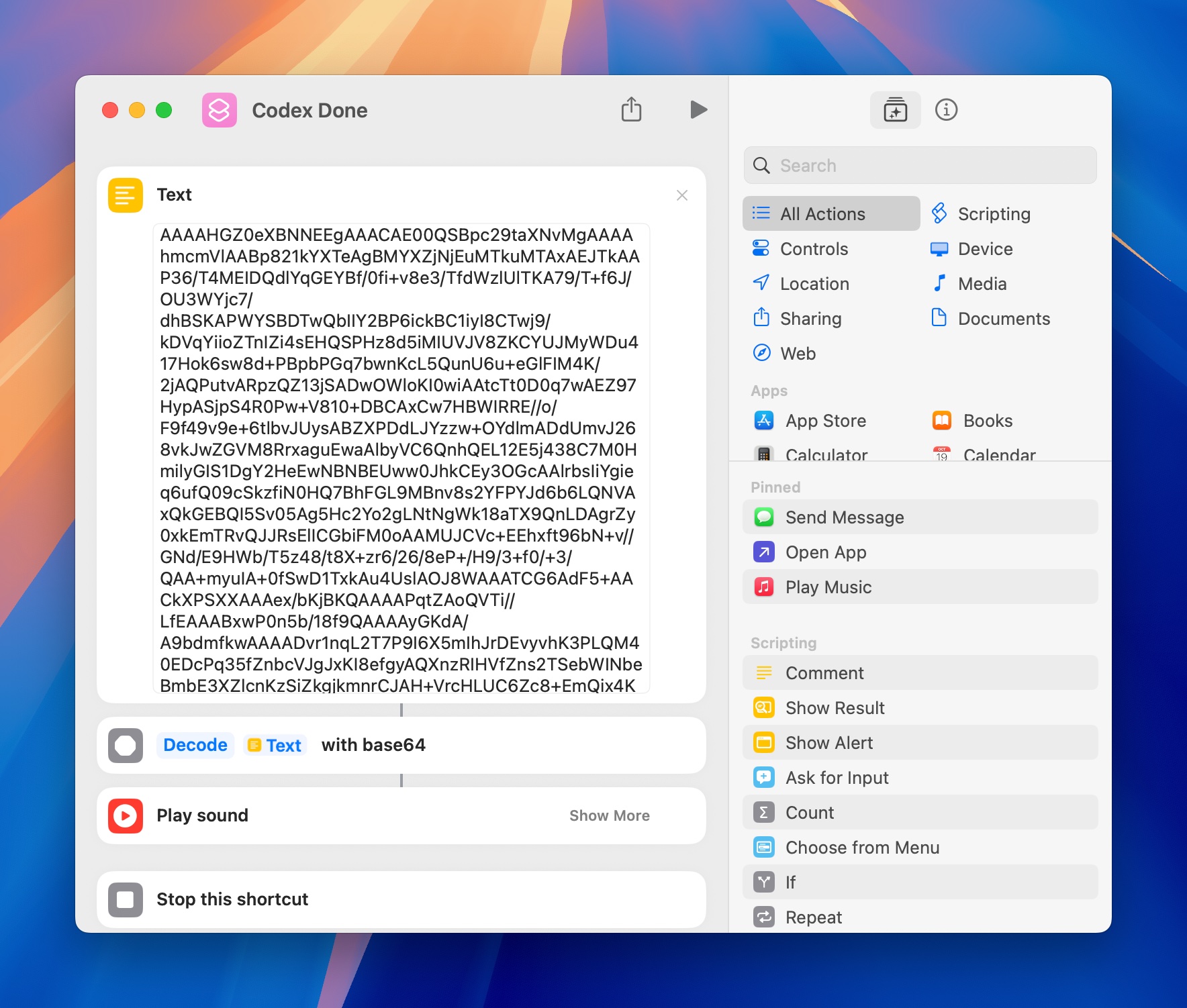
- Base64-encode any
m4aclip you want to ship with the Shortcut usingbase64 -i sound.m4a -o sound.b64, then paste that text into a Text block in Shortcuts. - Add a
Base64 Encode/Decodeaction set to Decode so the Shortcut reconstructs the audio file at runtime and hands it to aPlay Soundaction.
Why Shortcuts?
Shortcuts runs outside the terminal sandbox and can interact with system-level features such as audio output, spoken notifications, or focus modes. By delegating to Shortcuts, Codex stays lightweight while still giving you a customizable, high-trust way to signal when work is finished.
Official references:
rijie.li@outlook.com